

User Experience Guide
Welcome to the complete user guide for your cryptocurrency exchange platform. This guide covers all features available to users, from creating your first exchange to earning passive income through referrals.
Platform Overview
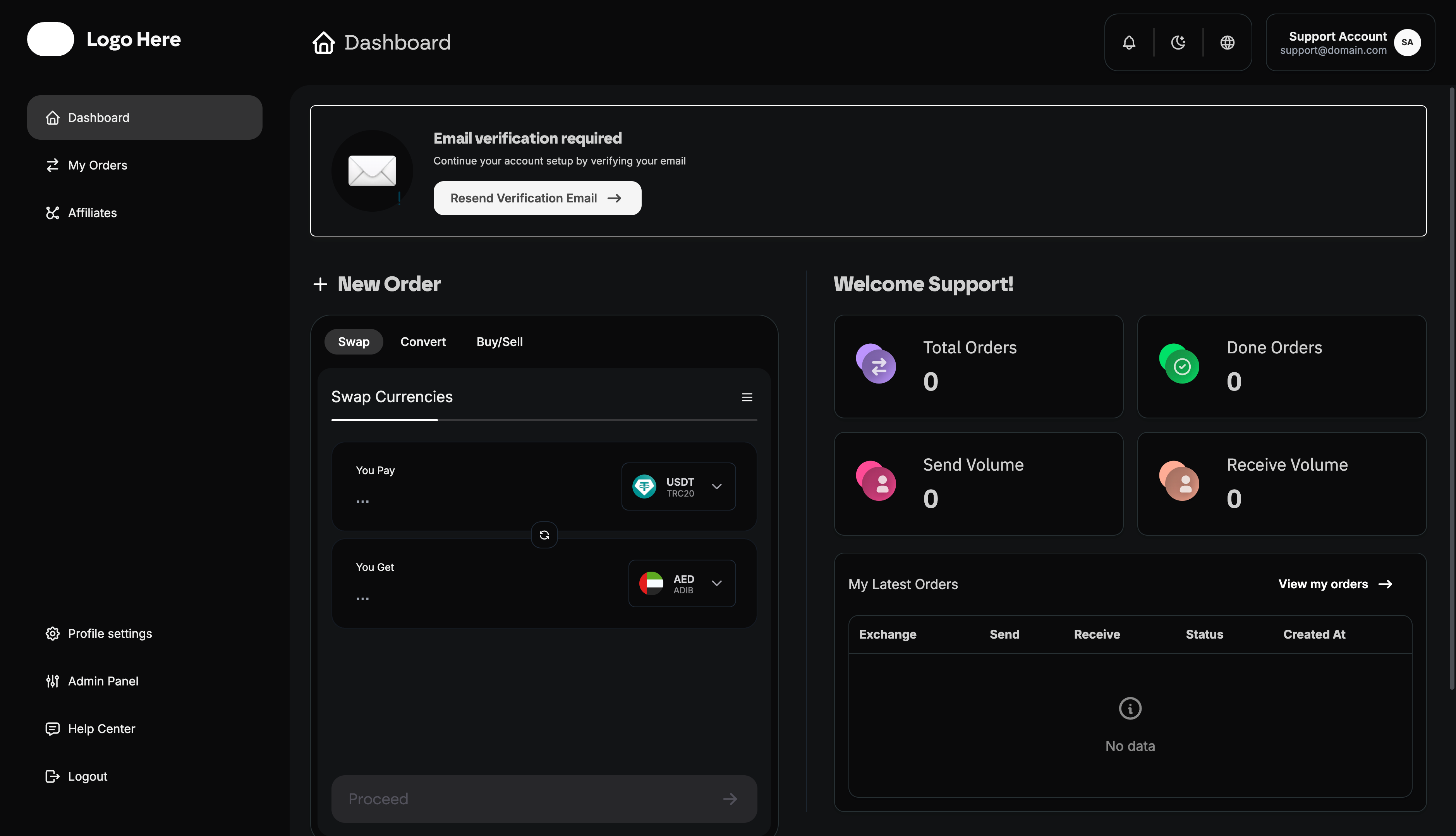
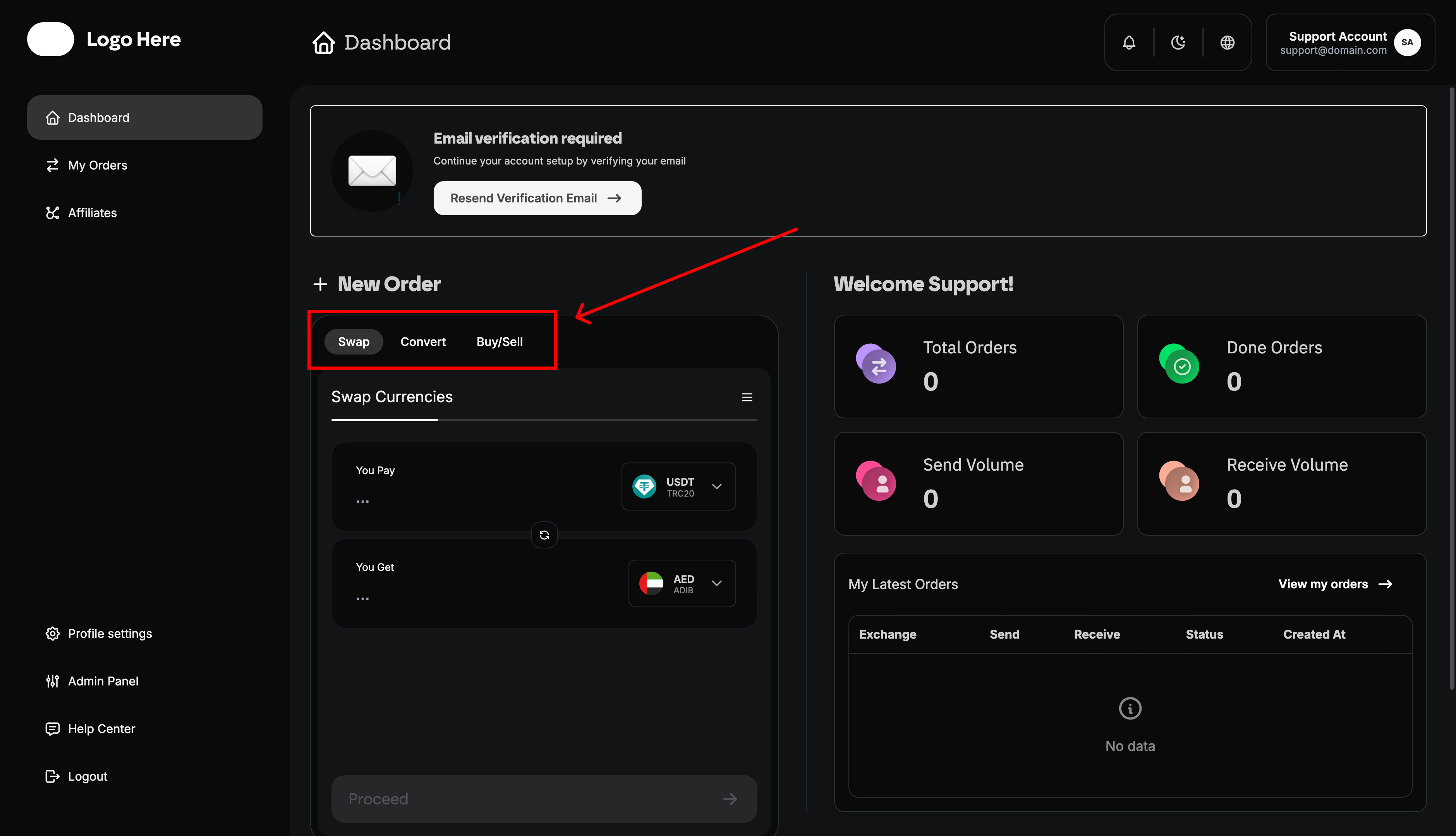
As a user, you have access to three powerful exchange services:
- Crypto-to-Crypto Exchange - Instantly swap between cryptocurrencies
- Fiat-to-Crypto Swap - Buy crypto with traditional payment methods
- Buy/Sell Services - Purchase crypto with credit cards or bank transfers
Getting Started
Account Creation
-
Sign Up
- Navigate to the registration page
- Provide your email address
- Create a strong password (minimum 8 characters)
- Agree to Terms of Service and Privacy Policy
-
Email Verification
- Check your email inbox
- Click the verification link
- Confirm your email address
- This unlocks full platform access
-
Two-Factor Authentication (2FA)
- Highly recommended for account security
- Enable in Account Settings
- Download an authenticator app (Google Authenticator, Authy)
- Scan QR code or enter secret key
- Verify with generated code
First Login
After registration, you’ll be directed to your personal dashboard where you can:
- View your account statistics
- Access the exchange calculator
- See your recent orders
- Manage your referral program
- Update account settings
Dashboard
The dashboard is your command center for all platform activities.
Statistics Overview
Your dashboard displays key performance metrics:
- Total Orders - All transactions you’ve created
- Completed Orders - Successfully finished exchanges
- Total Send Volume - Sum of all currencies you’ve sent
- Total Receive Volume - Sum of all currencies you’ve received
Quick Exchange Calculator
The main feature of your dashboard is the exchange calculator:
For Crypto-to-Crypto Exchange
-
You Send Section
- Select cryptocurrency (BTC, ETH, USDT, etc.)
- Enter amount to exchange
- Choose network if applicable (ERC-20, BEP-20, TRC-20)
-
You Receive Section
- Select destination cryptocurrency
- View calculated amount based on current rates
- Choose receiving network
-
Rate Information
- Current exchange rate displayed
- Total amount you’ll receive
- Rate validity timer
-
Destination Address
- Enter your wallet address for receiving funds
- Double-check address accuracy
- Add memo/tag if required by network
-
Review & Confirm
- Verify all details are correct
- Click “Exchange Now” to create order
- Receive payment instructions
For Fiat-to-Crypto Swap
-
Select Fiat Currency
- Select payment method (bank transfer, e-wallet, etc.)
- Enter amount to spend
-
Select Cryptocurrency
- Choose crypto to receive (BTC, ETH, USDT, etc.)
- View calculated crypto amount
-
Provide Details
- Enter your crypto wallet address
- Fill required payment information fields
-
Create Order
- Review exchange details and fees
- Submit order
- Follow payment instructions provided
Recent Orders Widget
Quick access to your latest 5 transactions:
- Exchange Pair - What you traded (e.g., USD → ETH)
- Amounts - Send and receive quantities
- Status - Current order state
- Created Date - When order was placed
Exchange Services
Crypto-to-Crypto Exchange (Convert)
The fastest way to swap between cryptocurrencies.
How It Works
-
Select Trading Pair
- Choose cryptocurrency to send
- Choose cryptocurrency to receive
-
Enter Amount
- Specify how much crypto to send
- View minimum and maximum limits
- See estimated amount you’ll receive
-
Provide Wallet Address
- Enter your receiving wallet address
- Ensure address matches selected network
- Add memo/tag if required (XRP, XLM, etc.)
-
Review Details
- Exchange rate and its validity period
- Total amount you’ll receive
-
Create Order
- Order is created instantly
- You receive deposit address
- Send crypto to provided address
- Order processes automatically
-
Track Progress
- Real-time status updates
- View transaction on blockchain explorer
Crypto Exchange Order Statuses
- Waiting - Order created, waiting for your deposit
- Confirming - Your deposit is being confirmed on blockchain
- Exchanging - Conversion in progress
- Sending - Funds being sent to your wallet
- Finished - Exchange completed successfully
- Failed - Exchange failed (funds returned)
- Refunded - Order cancelled, funds being returned
Supported Networks
- Bitcoin - Native Bitcoin blockchain
- Ethereum - ERC-20 tokens
- Binance Smart Chain - BEP-20 tokens
- Tron - TRC-20 tokens
- Polygon - MATIC network
- Solana - SOL network
- And more - Check platform for full list
Fiat-to-Crypto Swap
Exchange traditional money for cryptocurrencies.
How It Works
-
Select Payment Method
- Bank transfer
- E-wallet (PayPal, Skrill, etc.)
- Mobile money
- Cash pickup
- Online banking
-
Choose Amount & Currency
- Enter fiat amount to spend
- Select fiat currency (USD, EUR, etc.)
- Choose cryptocurrency to receive
- View fees and final amount
-
Fill Payment Details
- Provide required information for your payment method
- Enter crypto receiving address
- Add any additional notes
-
Submit Order
- Order is created with “Open” status
- You receive detailed payment instructions
- Send payment using provided details
- Mark order as “Paid” after sending
-
Wait for Verification
- Support team verifies your payment
- Order status updates to “In Progress”
- Exchange is processed
- Crypto sent to your wallet
-
Receive Confirmation
- Order marked as “Done”
- Email confirmation sent
- Transaction receipt available for download
Important Notes
- Processing Times - Vary by payment method (instant to 3 business days)
- Payment Proof - Keep proof of payment for verification
- Accuracy - Double-check all payment details before sending
- Communication - Respond promptly to support requests
- Limits - Each method has min/max transaction limits
Buy/Sell with Card or Bank Transfer
Quick purchases using credit cards or direct bank transfers.
Available Providers
- Transak - Global card payments, 100+ countries
- Itez - European bank transfers and cards
How It Works
-
Select Provider
- Choose based on your location
- Compare fees and processing times
- View supported payment methods
-
Enter Details
- Amount to purchase
- Cryptocurrency to buy
- Payment method (card or bank)
-
Complete KYC (First Time)
- Identity verification required by providers
- Upload ID document
- Take selfie for verification
- Usually takes 5-10 minutes
- Verification stored for future purchases
-
Make Payment
- Enter card details or bank information
- Complete 3D Secure verification if required
- Payment processed instantly
-
Receive Crypto
- Crypto sent to your wallet
- Usually within 10-30 minutes
- Email and in-app confirmation
Benefits
- Speed - Fastest way to buy crypto
- Convenience - Use existing payment methods
- Security - Regulated providers with KYC
- Support - Dedicated customer service
My Orders
Complete order history and management interface.
Order List View
Viewing Options
- All Orders - Complete transaction history
- Active Orders - Currently processing
- Completed Orders - Successfully finished
- Cancelled Orders - Failed or cancelled
Order Information Displayed
- Order ID - Unique transaction reference
- Type - Swap, Convert, Buy/Sell
- Exchange Pair - Currencies being traded
- Send Amount - What you’re sending
- Receive Amount - What you’re receiving
- Status - Current state
- Created Date - When order was placed
- Actions - View details, download receipt
Order Details Page
Click any order to view comprehensive information:
Order Summary
- Order Number - Unique identifier
- Creation Date & Time - When order was created
- Order Type - Exchange service used
- Current Status - Processing state
Transaction Details
What You’re Sending:
- Currency and amount
- Payment method
- Required information
- Payment instructions (if applicable)
What You’re Receiving:
- Currency and amount
- Receiving method
- Your wallet address
Fee Breakdown
- Network Fees - Blockchain transaction costs
- Service Fees - Platform charges (percentage + fixed)
- Exchange Rate - Rate applied to transaction
- Total Cost - All charges combined
- Net Amount - What you receive after fees
Payment Instructions (For Swap Orders)
- Payment Recipient - Who to send payment to
- Payment Details - Account numbers, IDs, etc.
- Payment Amount - Exact amount to send
- Payment Reference - What to include in transfer
- Payment Deadline - How long order remains valid
Order Timeline
Track your order through each stage:
- Order Created - Initial submission timestamp
- Payment Sent - When you marked payment as sent
- Payment Confirmed - Platform verified payment
- Processing Started - Exchange began
- Funds Sent - Crypto transferred to you
- Order Completed - Final completion timestamp
Order Actions
Available Actions
- Mark as Paid - For swap orders after sending payment
- Cancel Order - Before payment confirmation
- Download Receipt - PDF transaction confirmation
- Contact Support - Get help with specific order
- Track on Blockchain - View transaction on explorer
Real-Time Tracking
- WebSocket Updates - Instant status notifications in browser
- Email Notifications - Updates sent to your email
- Push Notifications - Mobile app notifications (if available)
- Status Change Alerts - Immediate notification of progress
Affiliate Program
Earn passive income by referring friends and family.
How the Referral Program Works
- You Invite - Share your unique referral code/link
- Friend Joins - They sign up using your code
- Friend Trades - They complete successful exchanges
- You Earn - Receive commission in USDT
- You Withdraw - Request payout when ready
Referral Dashboard
Access your affiliate performance metrics:
Earnings Summary
- Total Earnings - All-time commission earnings in USDT
- Available Balance - Funds ready for withdrawal
- Pending Commissions - Earnings being confirmed
- Withdrawn - Total amount already paid out
Referral Statistics
- Total Referrals - Number of people you’ve referred
- Active Referrals - Referred users who are still trading
- Successful Conversions - Referrals who completed first trade
Your Referral Tools
Unique Referral Code
- Personal Code - Short, memorable alphanumeric code
- Easy Sharing - Share via text, email, social media
- Case Insensitive - Works in any letter case
- Lifetime Code - Never expires
Referral Link
- Direct URL - Complete link with your tracking code
- One-Click Access - Recipients instantly reach signup page
- Mobile Friendly - Works on all devices
Commission Structure
How You Earn
Commissions are earned based on referral activity:
- Registration Bonus - When referral signs up (if applicable)
- First Trade Bonus - When referral completes first exchange
- Ongoing Commissions - Percentage of referral trading activity
- Lifetime Earnings - Continue earning as referrals keep trading
Withdrawal Process
Creating Withdrawal Request
- Meet Minimum - Ensure balance exceeds minimum withdrawal ($30 USDT)
- Navigate to Withdrawals - Click “Request Withdrawal” in Affiliates section
- Enter Amount - Specify how much to withdraw
- Provide Address - Enter your USDT wallet address (ERC-20, TRC-20, or BEP-20)
- Verify Network - Choose correct blockchain network
- Submit Request - Order sent to admin review queue
Withdrawal Status Tracking
- Pending - Request submitted, awaiting admin review
- Approved - Request approved, payment processing
- Paid - USDT successfully sent to your wallet
- Rejected - Request denied (reason provided)
Withdrawal Timeline
- Review Time - Usually 1-3 business days
- Processing Time - 1-24 hours after approval
- Blockchain Confirmation - 5-30 minutes depending on network
- Total Time - Typically 1-4 days from request to receipt
Maximizing Referral Earnings
Best Practices
-
Target Right Audience
- People interested in cryptocurrency
- Active traders and investors
- Friends exploring crypto for first time
- Online communities interested in finance
-
Provide Value
- Explain platform benefits clearly
- Offer help with first transaction
- Share educational resources
- Be available for questions
-
Use Multiple Channels
- Social media posts
- Email campaigns
- Blog content
- YouTube videos
- Crypto forums and communities
-
Stay Active
- Continue using platform yourself
- Share success stories
- Update content regularly
- Engage with referred users
-
Track Performance
- Monitor which channels work best
- Test different messaging
- Optimize based on data
- Focus on high-converting methods
Account Settings
Personal Information
Manage your account details:
Profile Settings
- Full Name - First and last name
- Email Address - Primary contact email (verified)
- Country/Region - Your location
- Language Preference - English, Arabic and more interfaces
Security Settings
Password Management
Change Password:
- Enter current password
- Create new strong password
- Confirm new password
- Save changes
- All sessions logged out (except current)
Password Requirements:
- Minimum 8 characters
- At least one uppercase letter
- At least one number
- At least one special character
- Cannot be common password
Two-Factor Authentication (2FA)
Enable 2FA:
- Go to Security Settings
- Click “Enable 2FA”
- Download authenticator app (Google Authenticator, Authy, etc.)
- Scan QR code shown
- Enter generated 6-digit code
- Save backup codes securely
- 2FA now required for login
Benefits of 2FA:
- Extra layer of account protection
- Prevents unauthorized access even if password is compromised
- Protects your funds and personal data
- Required for large withdrawals
Notification Preferences
Control how you receive updates:
Email Notifications
- Order Updates - Status changes, completions
- Affiliate - Affiliate rewards ready to be claimed
- Withdrawal Updates - status changes
- Platform News - New features, announcements
In-App Notifications
- Order Tracking - Live status updates
- Support Messages - Responses from team
- System Notifications - Important platform updates
Verification Status
Email Verification
- Status - Verified or Unverified
- Resend Verification - Get new verification email
- Change Email - Update and verify new address
Security Best Practices
Account Protection
-
Use Strong Passwords
- Mix uppercase, lowercase, numbers, symbols
- Avoid common words or personal information
- Use different password for this platform
- Consider password manager
-
Enable Two-Factor Authentication
- Always enable 2FA for maximum security
- Use authenticator app, not SMS if possible
- Save backup codes securely
- Never share 2FA codes with anyone
-
Secure Your Email
- Email is account recovery method
- Use strong email password
- Enable 2FA on email account
- Monitor for suspicious emails
-
Verify URLs
- Always check website address
- Bookmark official platform URL
- Beware of phishing sites
- Never click suspicious links in emails
Avoiding Scams
-
Too Good to Be True
- Unrealistic exchange rates
- Guaranteed returns promises
- Pressure to act immediately
- Trust your instincts
-
Phishing Attempts
- Fake emails from “support”
- Requests for passwords or 2FA codes
- Suspicious links or attachments
- Urgent account verification requests
-
Impersonation
- Fake support representatives
- Cloned websites
- Social media scammers
- Always verify authenticity
Getting Help
Support Channels
In-Platform Support:
- Navigate to Help/Support section
- Search knowledge base
- Submit support ticket
- Attach relevant screenshots
- Provide order numbers
Email Support:
- Send detailed description
- Include account email
- Attach proof/screenshots
- Wait for response (24-48 hours)
Live Chat:
- Instant assistance for urgent issues
- Available during business hours
- Provide order/account details
- Follow agent instructions
What to Include
- Account Information - Email, username (never password)
- Order Details - Order ID, type, amounts
- Issue Description - Clear explanation of problem
- Screenshots - Visual proof of issue
- Steps Taken - What you’ve already tried
- Urgency Level - How urgent is your issue
Tips for Successful Trading
Before Trading
- Research - Understand cryptocurrencies you’re trading
- Check Rates - Compare with other platforms
- Read Terms - Understand fees and policies
- Verify Details - Double-check all information
- Start Small - Test platform with small amount
During Trading
- Be Patient - Processing takes time
- Follow Instructions - Complete all required steps
- Keep Proof - Save payment confirmations
- Monitor Status - Track order progress
- Ask Questions - Contact support if unsure
After Trading
- Verify Receipt - Confirm crypto in wallet
- Download Receipt - Save transaction record
- Leave Feedback - Help improve platform
- Refer Friends - Earn through affiliate program
- Plan Next Trade - Build your portfolio
This comprehensive user guide covers everything you need to successfully use the platform. For additional help, contact our support team or visit the Help Center for more detailed articles and video tutorials.