

Admin Panel Guide
The admin panel provides complete control over your white label swapping platform. This comprehensive guide covers all administrative functions and tools available to platform owners and administrators.
Admin Panel Overview
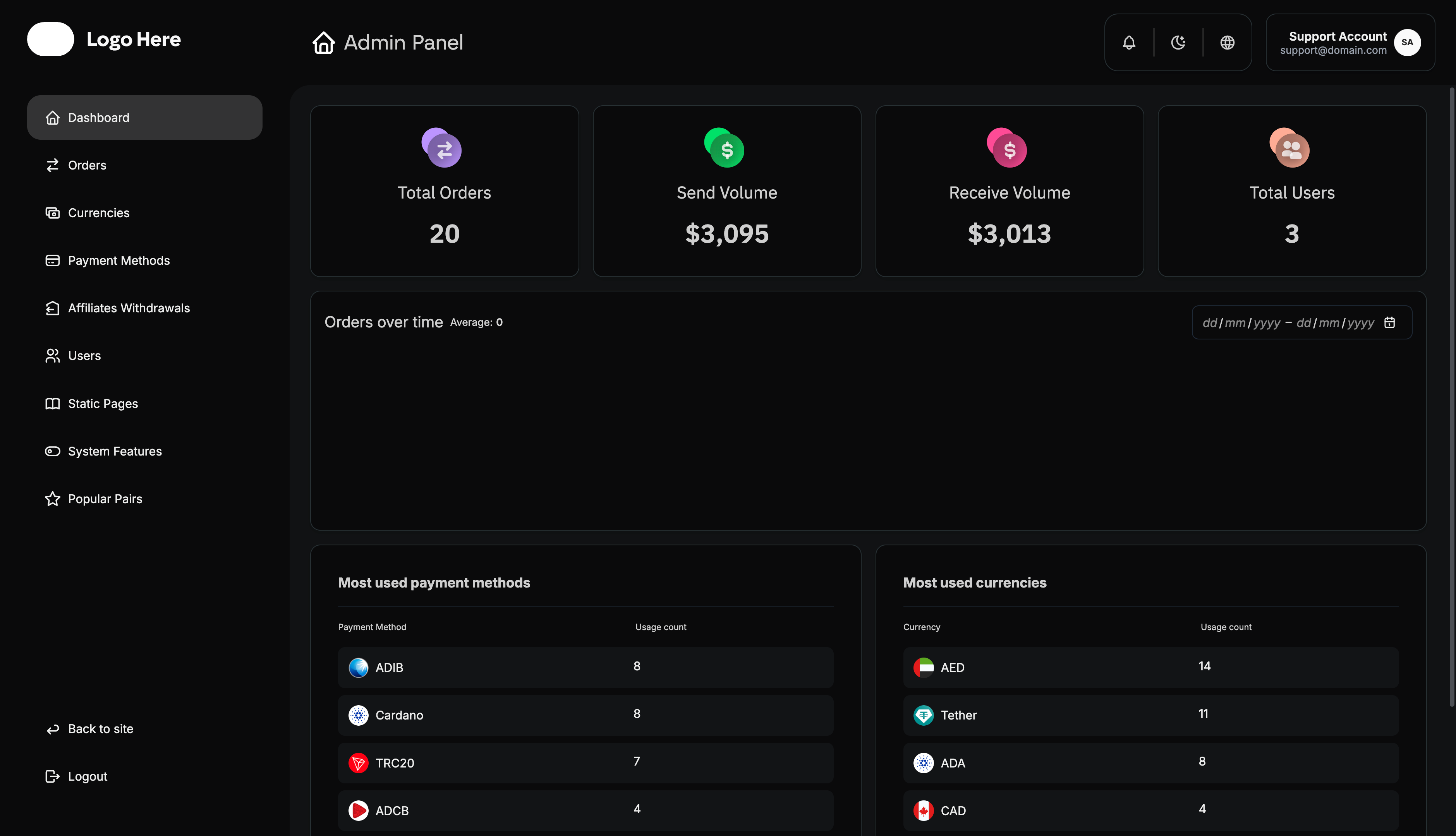
The admin panel contains the following main sections:
- Dashboard - Analytics and platform overview
- Orders - Order management and processing
- Currencies - Currency configuration and management
- Payment Methods - Payment option setup and customization
- Affiliates Withdrawals - Referral program payout management
- Users - User account management and roles
- Static Pages - Content management
Dashboard
The dashboard provides real-time analytics and key performance indicators for your platform:
Key Metrics Displayed
- Total Orders Made - Complete order count since platform launch
- Orders’ Sending Volume - Total value of all sending transactions
- Orders’ Receiving Volume - Total value of all receiving transactions
- Total Number of Users - All registered platform users
- Confirmed Users - Users who have completed email/phone verification
- Orders Statistics Over Time - Historical performance charts
- Most Used Payment Methods - Popular payment options analytics
- Most Used Currencies - Currency preference statistics
The dashboard ensures administrators stay informed about platform performance and can make data-driven decisions for business growth.
Orders Management
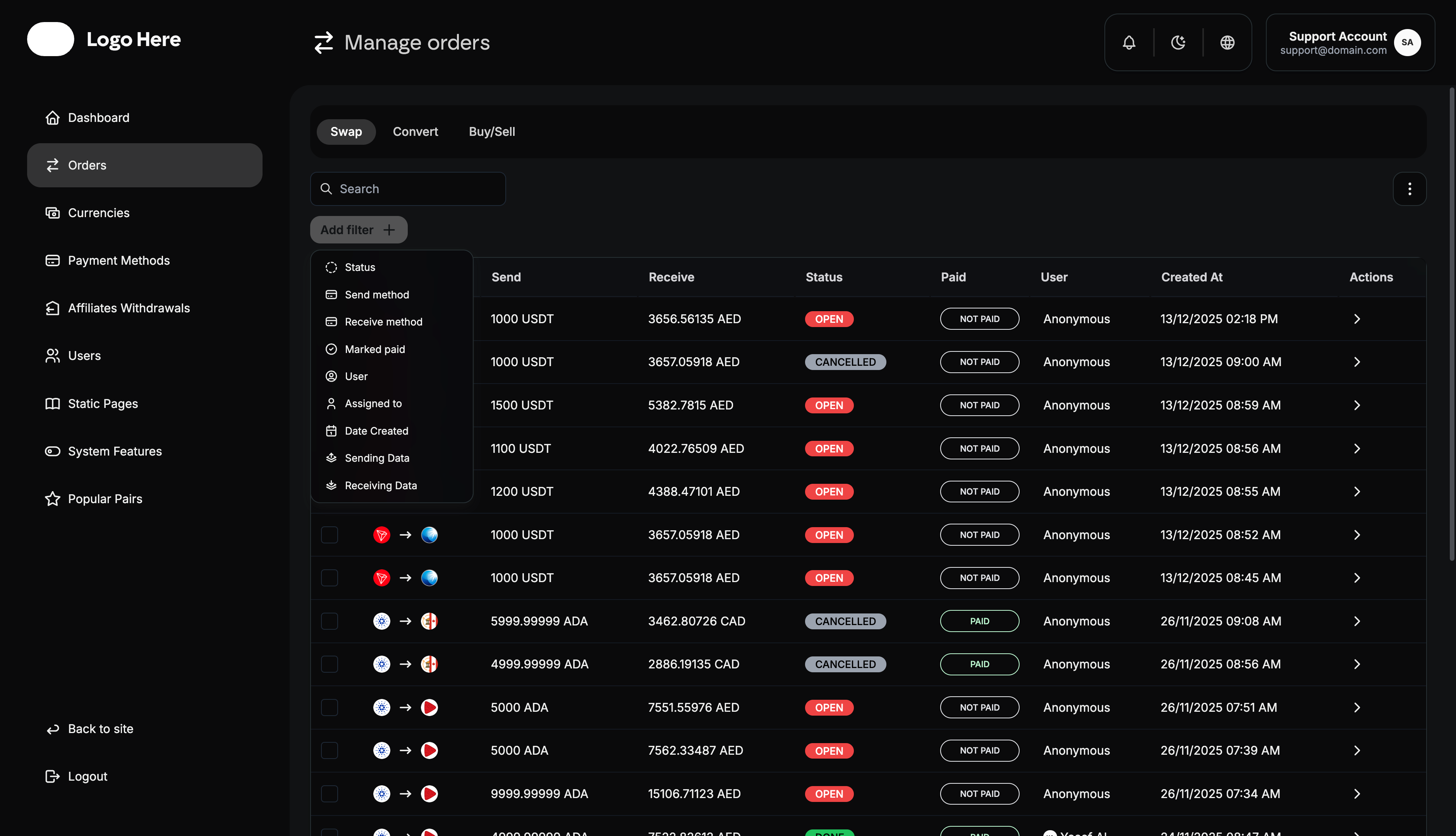
The orders page is the heart of your platform operations, designed with flexible viewing options and comprehensive management tools.
Order Categories
- Exchange - Transaction methods used for the swap
- Send - Amount being sent by the user
- Receive - Amount being received by the user
- Status - Current order processing status
- Paid - User payment confirmation (Paid/Not Paid)
- User - Customer username or identifier
- Created At - Order creation timestamp
- Actions - Administrative control tools
Order System Tools
Always verify payment details before marking an order as complete. Double-check receiving addresses and amounts to prevent errors.
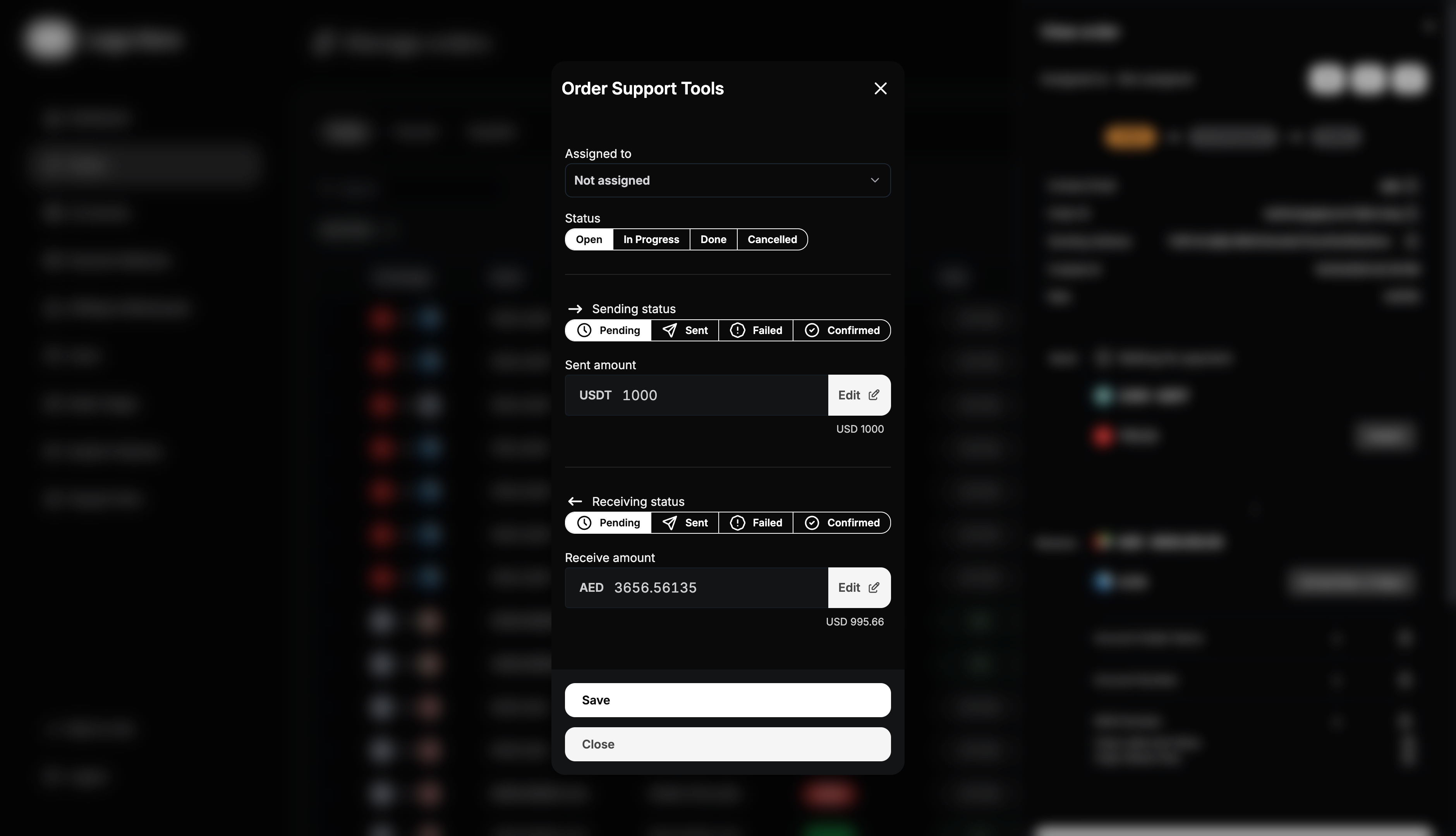
A. Order Support Tools
These tools control the manual swap operation workflow:
- Assigned To - Designate which admin/agent is handling the order
- Status - Set order status (Open → In Progress → Done → Cancelled)
- Sending Status - Track sending amount status (Pending → Sent → Failed → Confirmed)
- Receiving Status - Track receiving amount status (Pending → Sent → Failed → Confirmed)
- Receive Amount - Adjust exact amounts for sending and receiving
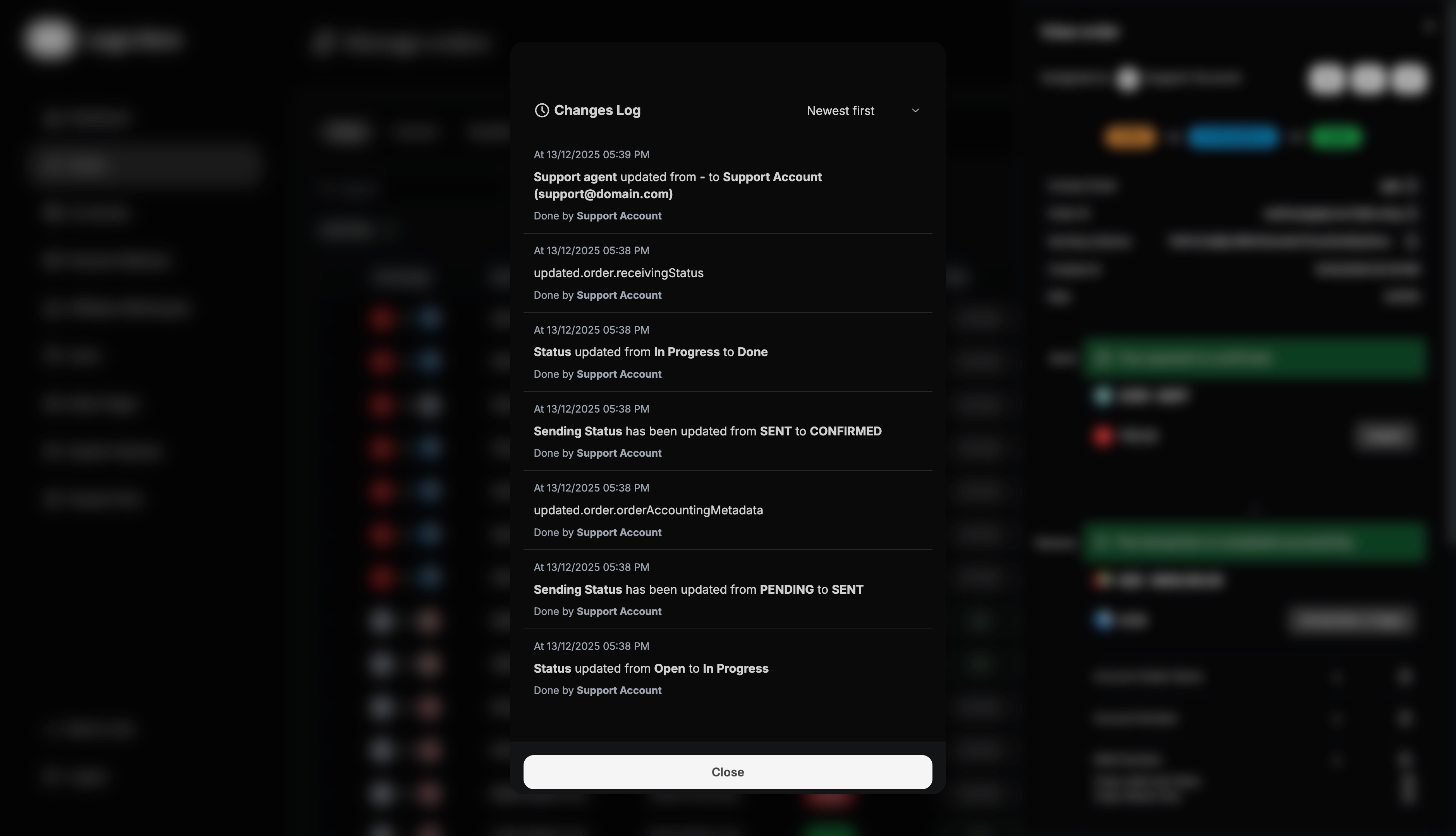
B. Changes Log
Displays complete order history including:
- Who modified the order
- What changes were made
- When changes occurred
- Current vs. previous status comparisons
C. Archive Orders Command
- Archive unwanted orders from the main list
- Orders are not permanently deleted, just hidden
- Use filters to view archived orders when needed
- Maintains clean, organized order lists
Order Filtering System
Advanced filtering options help manage large order volumes:
- Status Filter - Show orders by status (Open, In Progress, Done, Cancelled)
- Send Method Filter - Filter by user’s chosen sending method
- Receive Method Filter - Filter by user’s chosen receiving method
- Marked Paid Filter - Show paid vs unpaid orders
- User Filter - View all orders from specific users
- Assigned To Filter - Show orders handled by specific agents/admins
- Date Created Filter - Filter orders by creation date range
Currencies Management
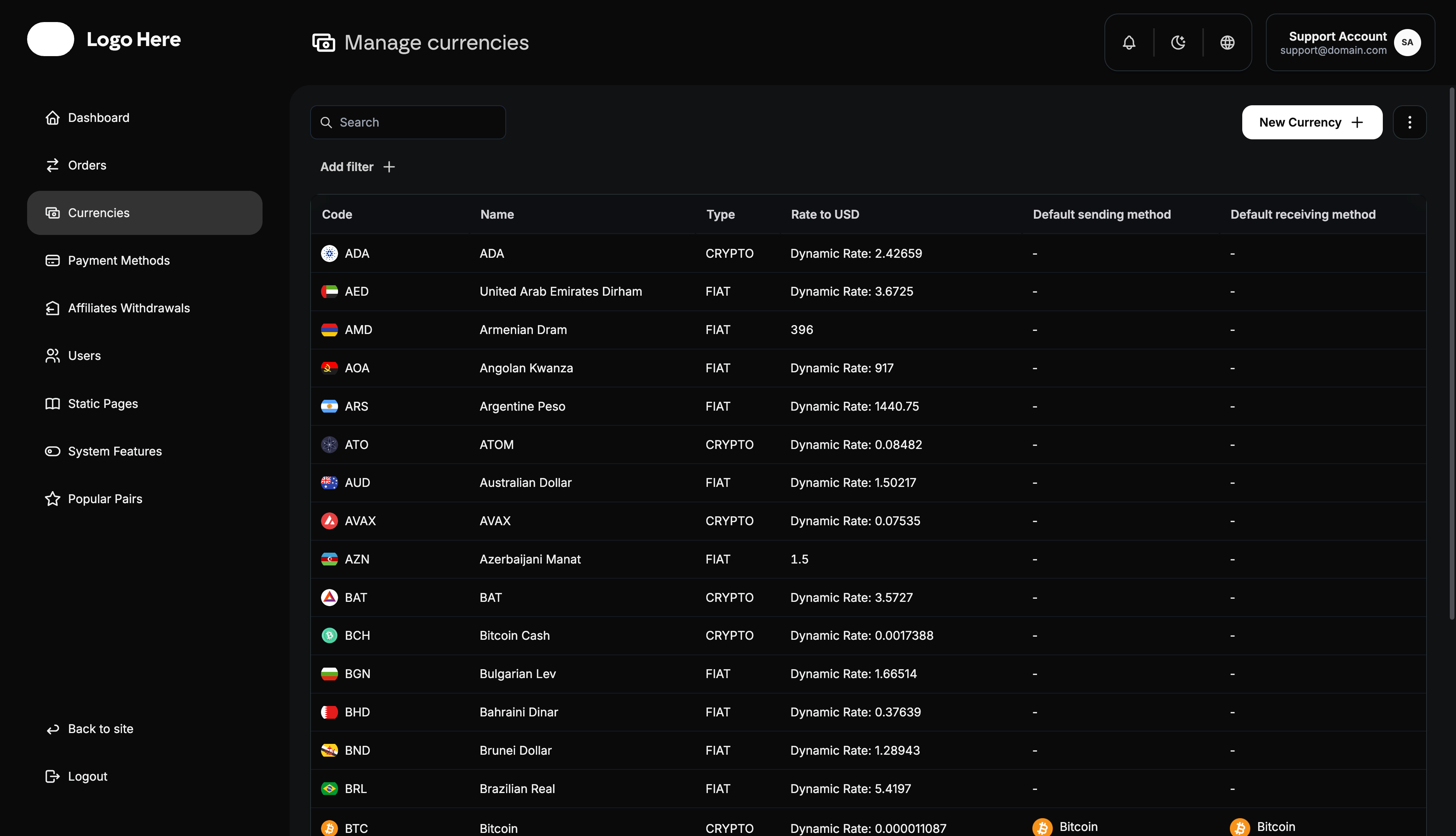
The currencies page allows you to manage all supported currencies on your platform.
Currency Listings
Currencies are displayed with the following information:
- Code - Currency abbreviation (USD, BTC, EUR, etc.)
- Name - Full currency name and country
- Type - Currency classification (Fiat/Cryptocurrency)
- Rate to USD - Exchange rate method (Manual/Dynamic)
- Default Sending Method - Primary payment method for sending
- Default Receiving Method - Primary payment method for receiving
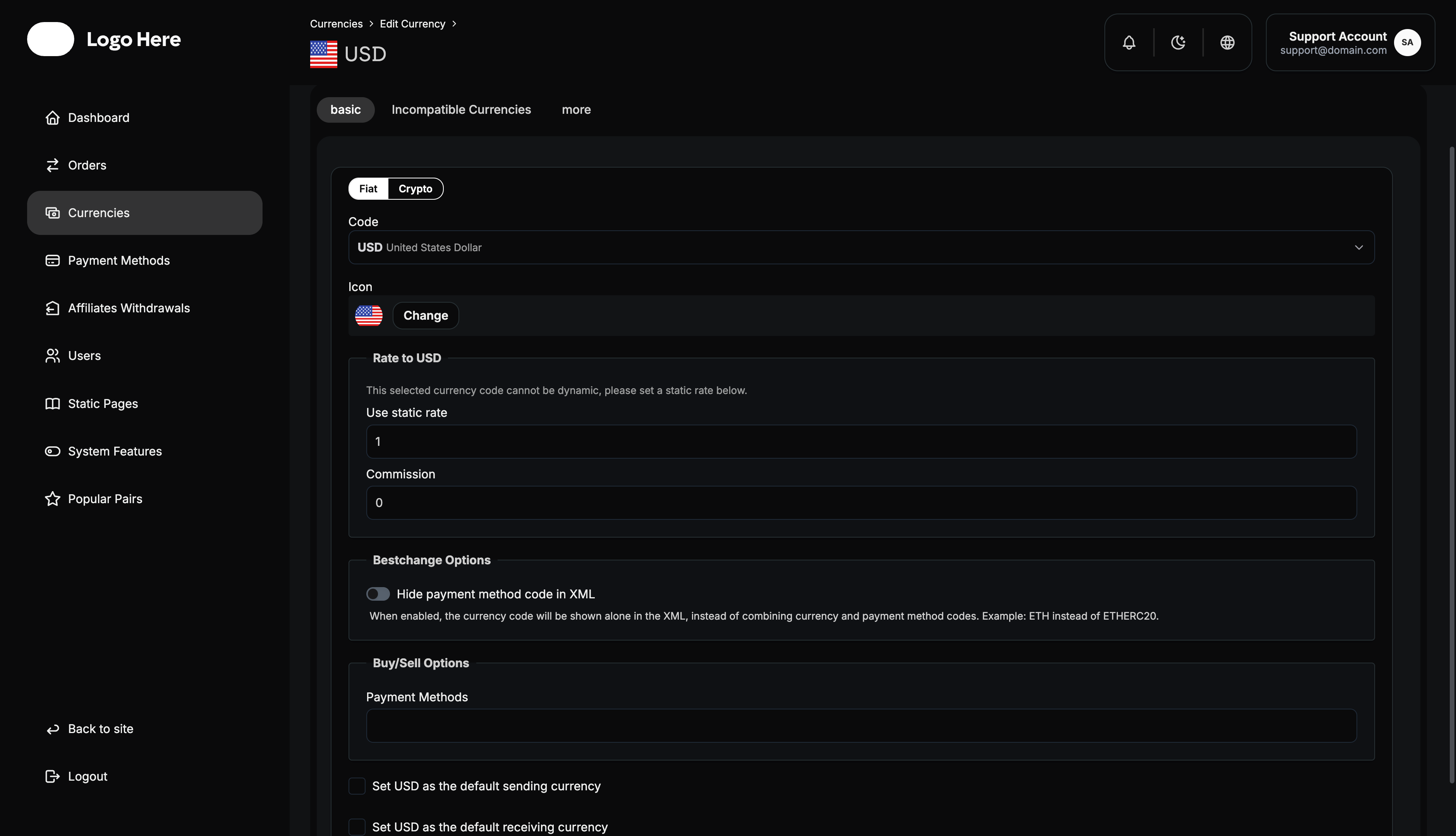
Adding New Currencies
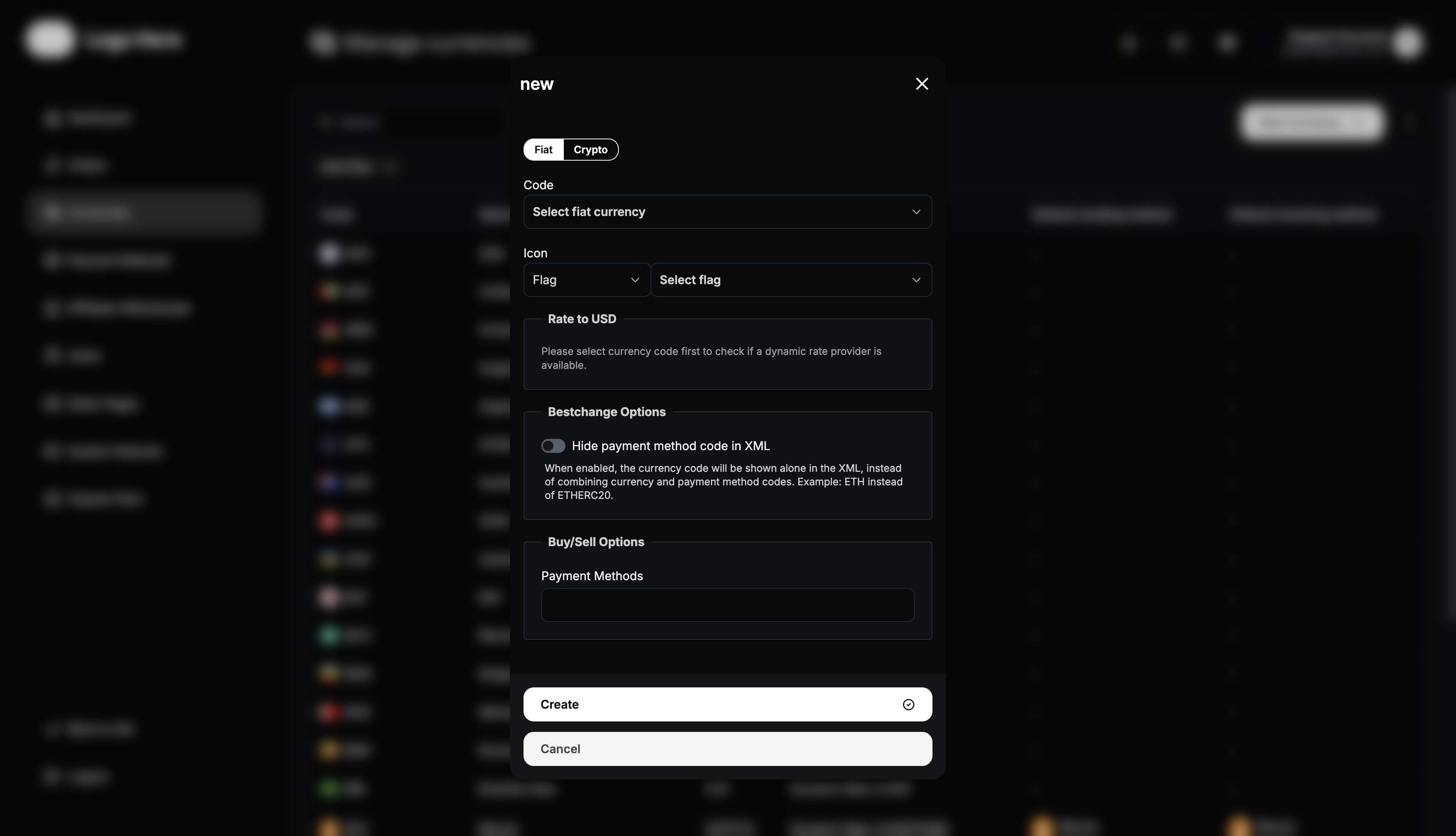
Fiat Currency Setup
- Code - Select from standard fiat currency codes
- Icon - Upload country flag or currency symbol
- Rate to USD - Set exchange rate (manual or dynamic)
- Create - Save the new currency
Cryptocurrency Setup
- Name - Enter cryptocurrency name
- Code - Enter standard crypto code (BTC, ETH, etc.)
- Icon - Upload cryptocurrency logo
- Rate to USD - Set exchange rate method
- Create - Save the new cryptocurrency
Payment Methods Management
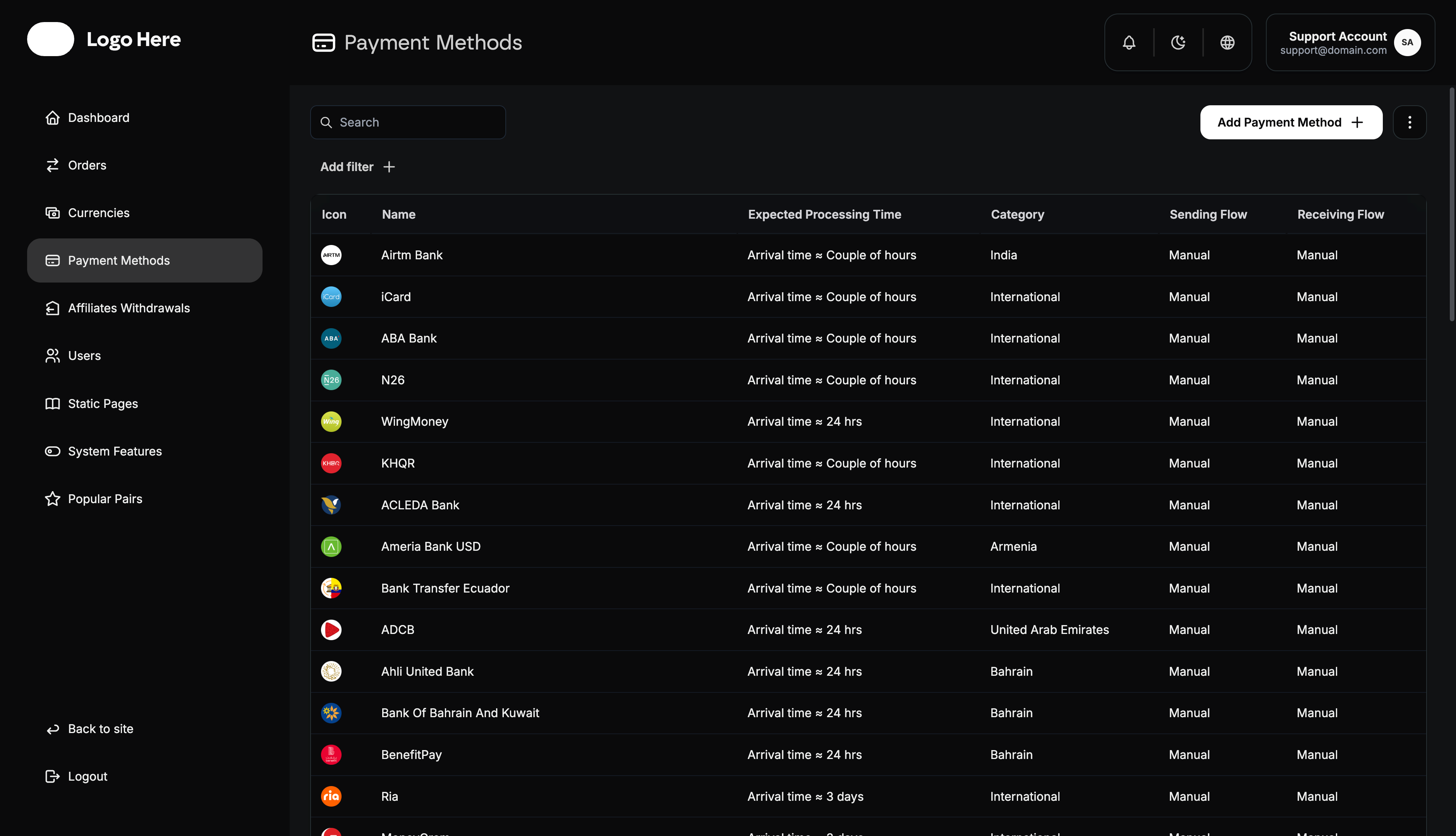
The payment methods page handles all payment options available to users.
Payment Method Display
Methods are organized by:
- Icon - Payment method logo/visual identifier
- Name - Payment method title
- Expected Processing Time - Estimated completion timeframe
- Sending Flow - Whether sending is manual or automated
- Receiving Flow - Whether receiving is manual or automated
Adding New Payment Methods
To add a payment method, provide:
- Name - Payment method title
- Icon - Method logo/icon upload
- Category - Country/region where method is available
- Expected Processing Time - Set realistic processing timeframes
- Crypto Network - For crypto methods, specify blockchain network
- Sending Capability - Enable if users can send with this method
- Sending Flow - Choose manual or automated processing
- Receiving Information - Add details users need for sending
- Receiving Capability - Enable if users can receive with this method
Payment Method Configuration
Each payment method can be customized through six main tabs:
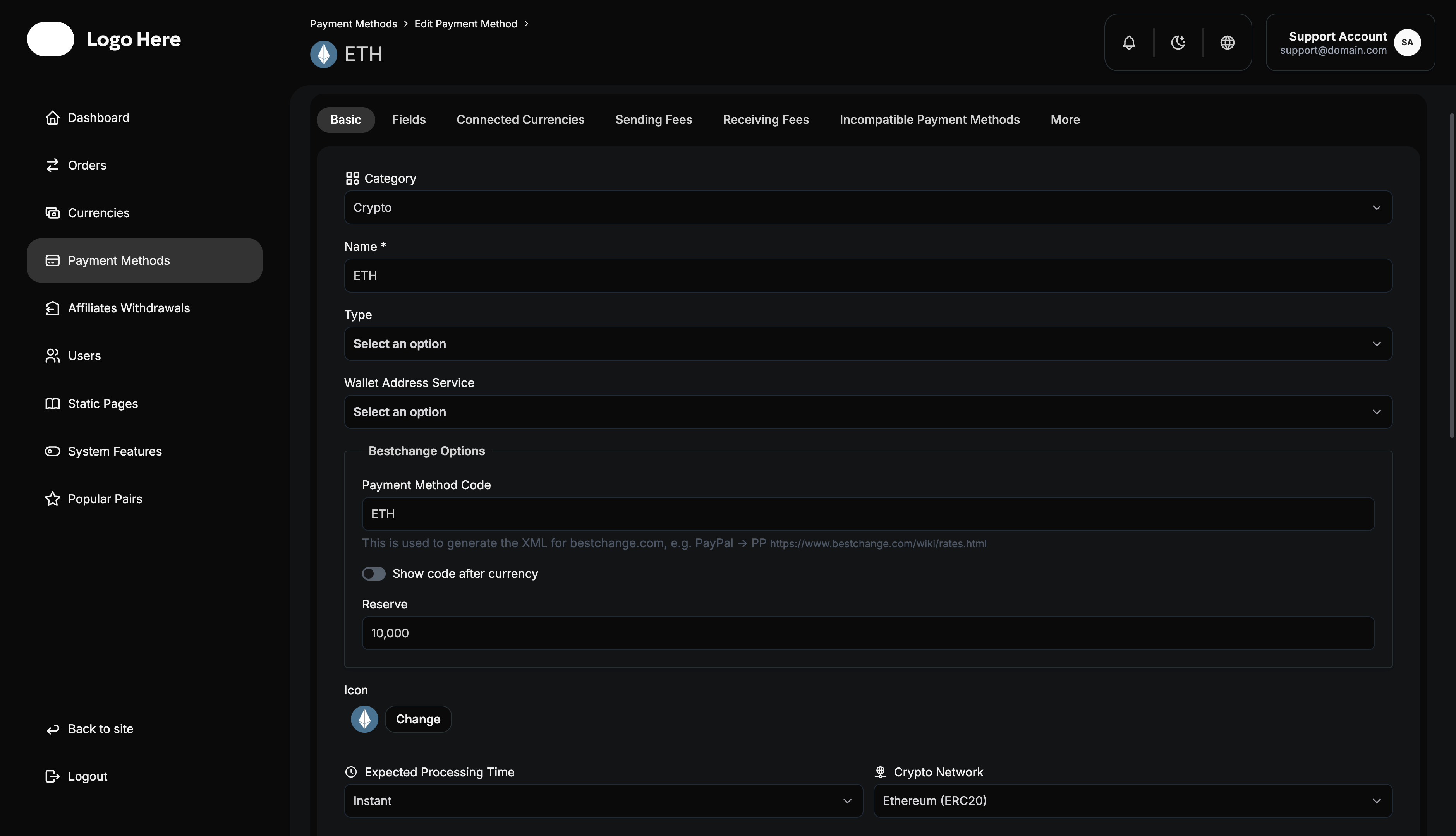
Basic Settings
- Name & Icon - Method identification
- Category & Location - Geographic availability
- Processing Time - Expected completion timeframe
- Crypto Network - Blockchain specification for crypto methods
- Extra Information - Multi-language user instructions (Arabic/English)
- Send/Receive Capabilities - Enable appropriate functionalities
- Processing Flows - Manual vs automated handling
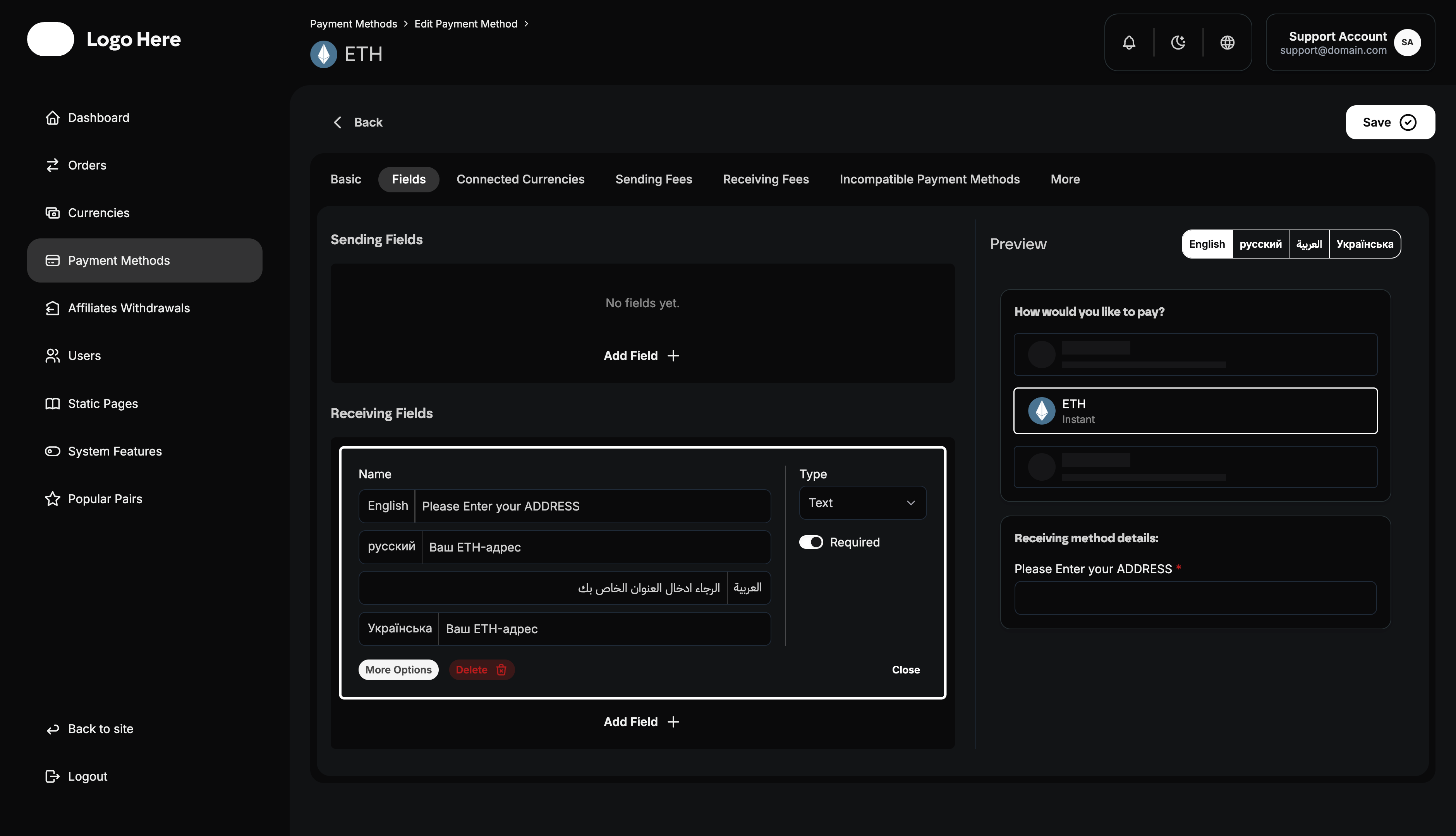
Fields Configuration
Define required user inputs:
- Sending Fields - Information needed when users send money
- Receiving Fields - Information needed when users receive money
- Field Requirements - Mark fields as optional or mandatory
- Multi-language Support - Arabic and English field labels
Connected Currencies
- Currency Linking - Associate payment methods with specific currencies
- Default Currency Setting - Set primary currency for the method
- Currency Restrictions - Limit method to specific currencies only
Sending Fields (Fees & Limits)
- MIN Amount - Minimum sending limit
- MAX Amount - Maximum sending limit
- Fixed Fees - Set flat fee amounts
- Percentage Fees - Set percentage-based fees
- Zero Fee Option - Enable fee-free transactions
Receiving Fields (Fees & Limits)
- MIN Amount - Minimum receiving limit
- MAX Amount - Maximum receiving limit
- Fixed Fees - Set flat fee amounts
- Percentage Fees - Set percentage-based fees
- Zero Fee Option - Enable fee-free transactions
Set realistic minimum and maximum limits. Limits that are too restrictive will frustrate users, while limits that are too loose may expose you to unnecessary risk.
More Options
- Activate/Deactivate - Enable or disable payment methods
- Delete Method - Permanently remove payment options
Affiliates Withdrawals Management
Track and process affiliate program payouts:
Process affiliate withdrawals promptly to maintain trust and encourage continued promotion of your platform.
Withdrawal Request Information
- Status - Request status (Pending, Approved, Paid)
- Withdraw Amount - Requested payout amount
- User - Affiliate account making the request
- Receiving Address - Payout destination address
- Created At - Request submission time
- Updated At - Last processing update time
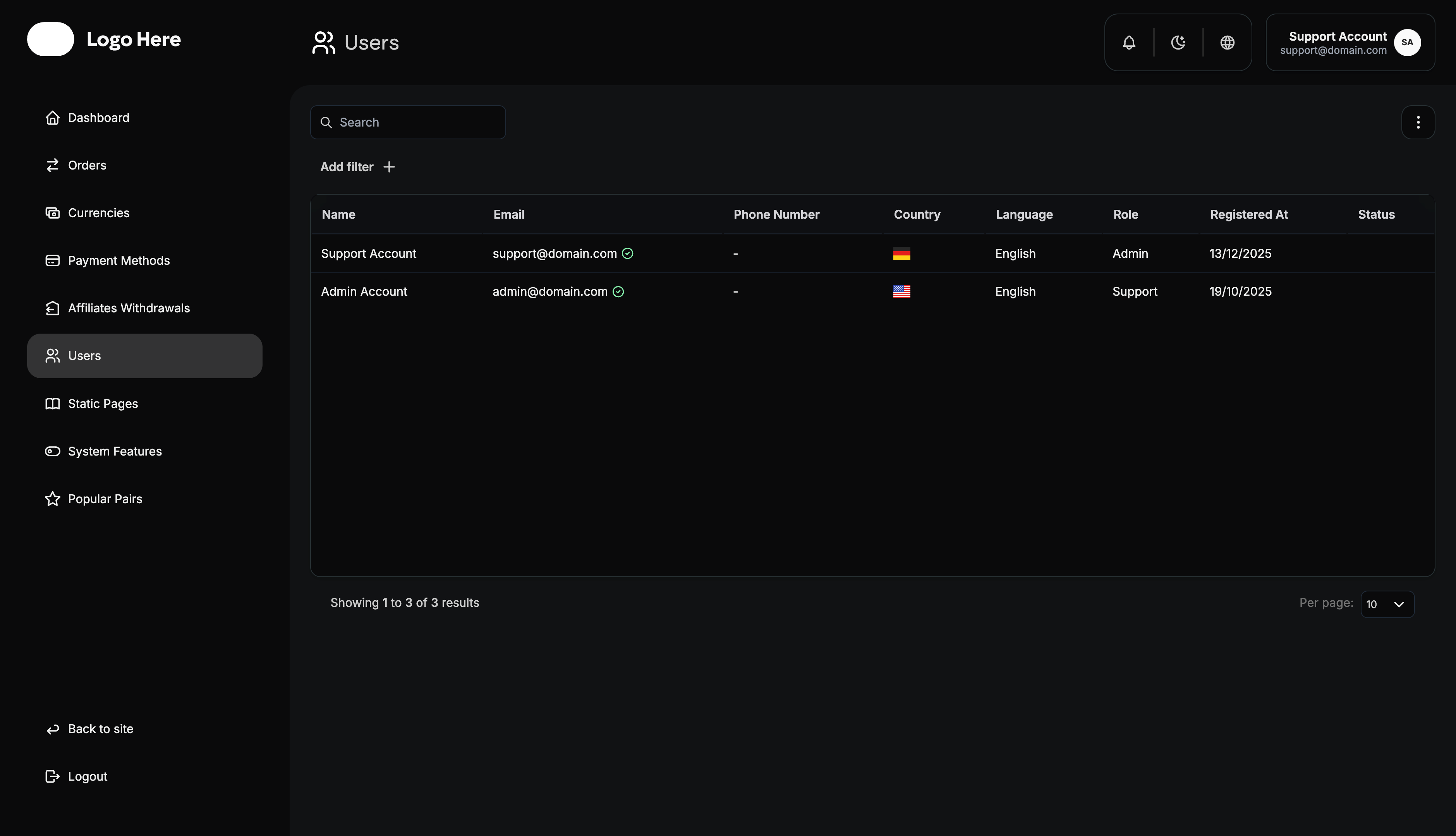
Users Management
Comprehensive user account administration:
Effective user management balances platform security with user convenience. Monitor for suspicious activity while avoiding unnecessary friction for legitimate users.
User Information Display
- Name - First and last name
- Email - Account registration email
- Phone Number - Registered phone number
- Country - Registration origin country
- Language - User preference (English/Arabic)
- Role - Account access level
- Registered At - Account creation date
- Status - Account standing (Active/Suspended)
User Roles & Permissions
- Admin - Full platform access and control
- Moderator - Development and advanced access
- Support - Order processing and user data access
- User - Standard platform usage rights
- Business - Special business account privileges
User Account Details
For each user, view detailed information:
- Total Orders - All orders created by user
- Done Orders - Successfully completed transactions
- Referral Balance - Current affiliate earnings
- Referred Users - Count of successful referrals
- Total Referral Profit - Lifetime affiliate earnings
- Account Information - Personal details and contact info
- Suspension Controls - Account status management
Always document the reason for suspending a user account. This protects your platform legally and helps maintain consistent enforcement of policies.
User Filtering Options
Filter users by:
- Country - Registration location
- Language - Platform language preference
- Role - Account access level
- Email Confirmed - Email verification status
- Phone Confirmed - Phone verification status
- Suspended - Account suspension status
- Registered At - Registration date range
Best Practices for Admin Management
Establish standard operating procedures (SOPs) for common tasks. This ensures consistency across your team and reduces errors.
- Regular Monitoring - Check dashboard metrics daily
- Order Processing - Handle manual orders promptly
- User Support - Respond to user issues quickly
- Security Checks - Monitor for suspicious activities
- Fee Optimization - Regularly review and adjust fees
- Currency Updates - Keep exchange rates current
- Payment Method Testing - Verify all payment options work correctly
- Data Backup - Regularly export important data
- Role Management - Assign appropriate user roles
- Performance Analysis - Use analytics to improve operations
Troubleshooting Common Issues
Order Processing Problems
- Check payment method configurations
- Verify currency rate settings
- Confirm user payment status
- Review order assignment
User Account Issues
- Verify email/phone confirmations
- Check role assignments
- Review account suspension status
- Confirm registration details
Most user account issues stem from incomplete verification. Encourage users to complete email and phone verification during onboarding.
Payment Method Problems
- Test sending/receiving capabilities
- Verify fee calculations
- Check currency connections
- Review processing time settings
Security Considerations
Security should be your top priority. A single security breach can destroy user trust and your platform’s reputation.
- Admin Access Control - Limit admin account creation
- Regular Password Updates - Enforce strong password policies
- Activity Monitoring - Track all administrative actions
- Data Protection - Secure sensitive user information
- Backup Procedures - Maintain regular data backups
- Access Logging - Monitor who accesses what data
This admin panel guide provides the foundation for effectively managing your white label swapping platform. Regular use of these tools will help ensure smooth operations and business growth.