

Order Management & Processing
Order management is the core operational function of your white label swapping platform. This guide covers the complete order lifecycle, processing workflows, and administrative tools needed to efficiently manage customer transactions.
Efficient order management is critical to user satisfaction. Fast, accurate processing builds trust and encourages repeat business.
Order Status Types
Primary Status Categories
- Open - Order created, awaiting user payment
- In Progress - Payment received, exchange being processed
- Done - Exchange completed successfully
- Cancelled - Order cancelled or failed
Detailed Status Tracking
Sending Status Options
- Pending - Waiting for user to send payment
- Sent - User has sent payment (awaiting confirmation)
- Failed - Payment sending failed or rejected
- Confirmed - Payment received and verified
Receiving Status Options
- Pending - Exchange not yet processed
- Sent - Funds sent to user’s receiving method
- Failed - Transfer to user failed
- Confirmed - User successfully received funds
Never mark an order as “Done” until you have confirmed the user has received their funds. Premature completion can lead to disputes.
Order Display and Organization
Category View Organization
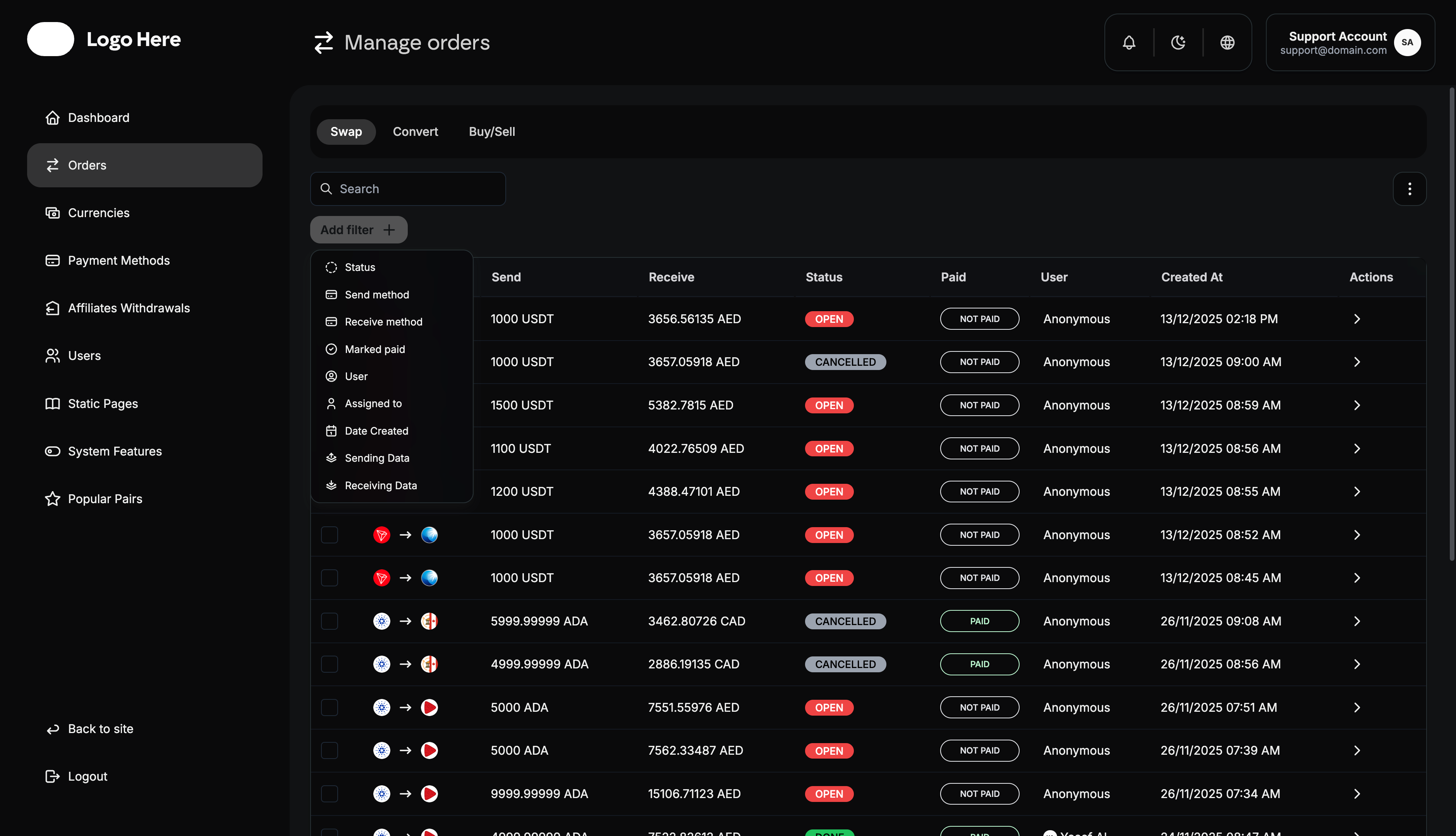
Orders can be organized by multiple categories:
- Send Method - The payment method used by the customer to send
- Receive Method - The payment method and currency in which the recipient will receive
- Status - Current order processing status
- Paid - Payment confirmation status (Paid/Not Paid)
- User - Customer username or identifier
- Assigned To - The agent or staff member responsible for processing the order
- Created At - Order creation timestamp
- Sending Data - The payment details and information provided by the sender to execute the order
- Receiving Date - The date and time when the order was fulfilled and funds were disbursed to the recipient
Status View Organization
Alternative view grouping orders by current status:
- All Open orders together
- All In Progress orders together
- All Done orders together
- All Cancelled orders together
Order Processing Tools
Assignment Management
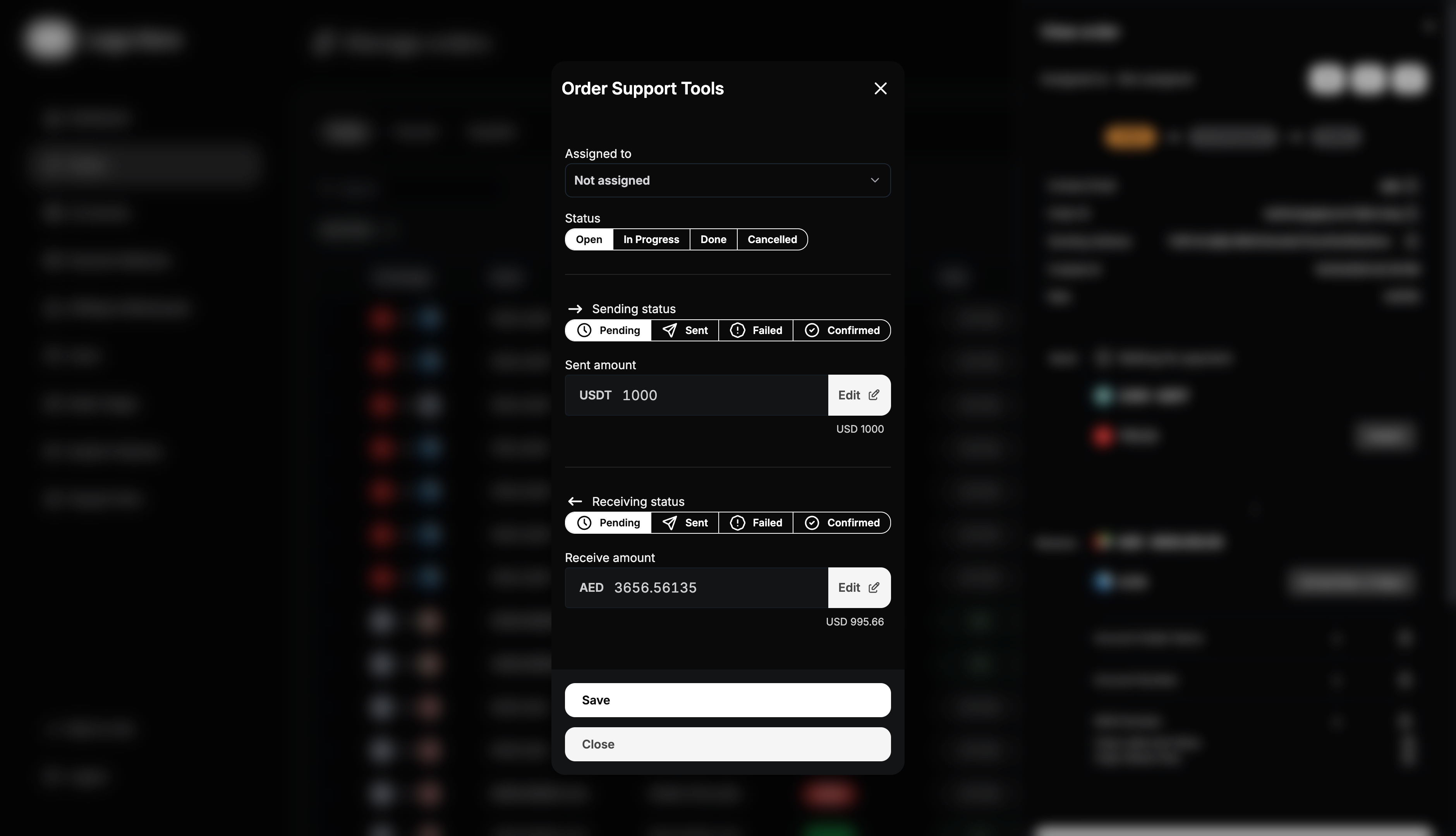
Assigned To functionality allows:
- Designate specific admin or support agent to handle order
- Track who is responsible for each transaction
- Distribute workload among team members
- Ensure accountability in order processing
- Enable specialized handling for complex orders
Status Management Tools
Order Status Control
- Open → In Progress - When payment is confirmed
- In Progress → Done - When exchange is completed
- Any Status → Cancelled - For failed or cancelled orders
- Status History - Track all status changes with timestamps
Payment Status Control
- Update Sending Status - Mark payment as received/confirmed
- Update Receiving Status - Mark funds as sent to user
- Payment Verification - Confirm payment amounts and methods
- Failed Payment Handling - Process payment failures or issues
Amount Adjustment Tools
Receive Amount controls allow:
- Exact Amount Calculation - Determine precise amounts after fees
- Exchange Rate Application - Apply current market rates
- Fee Deduction - Calculate net amounts after platform fees
- Manual Adjustments - Handle special cases or corrections
- Amount Verification - Confirm calculations before processing
Order History and Tracking
Changes Log System
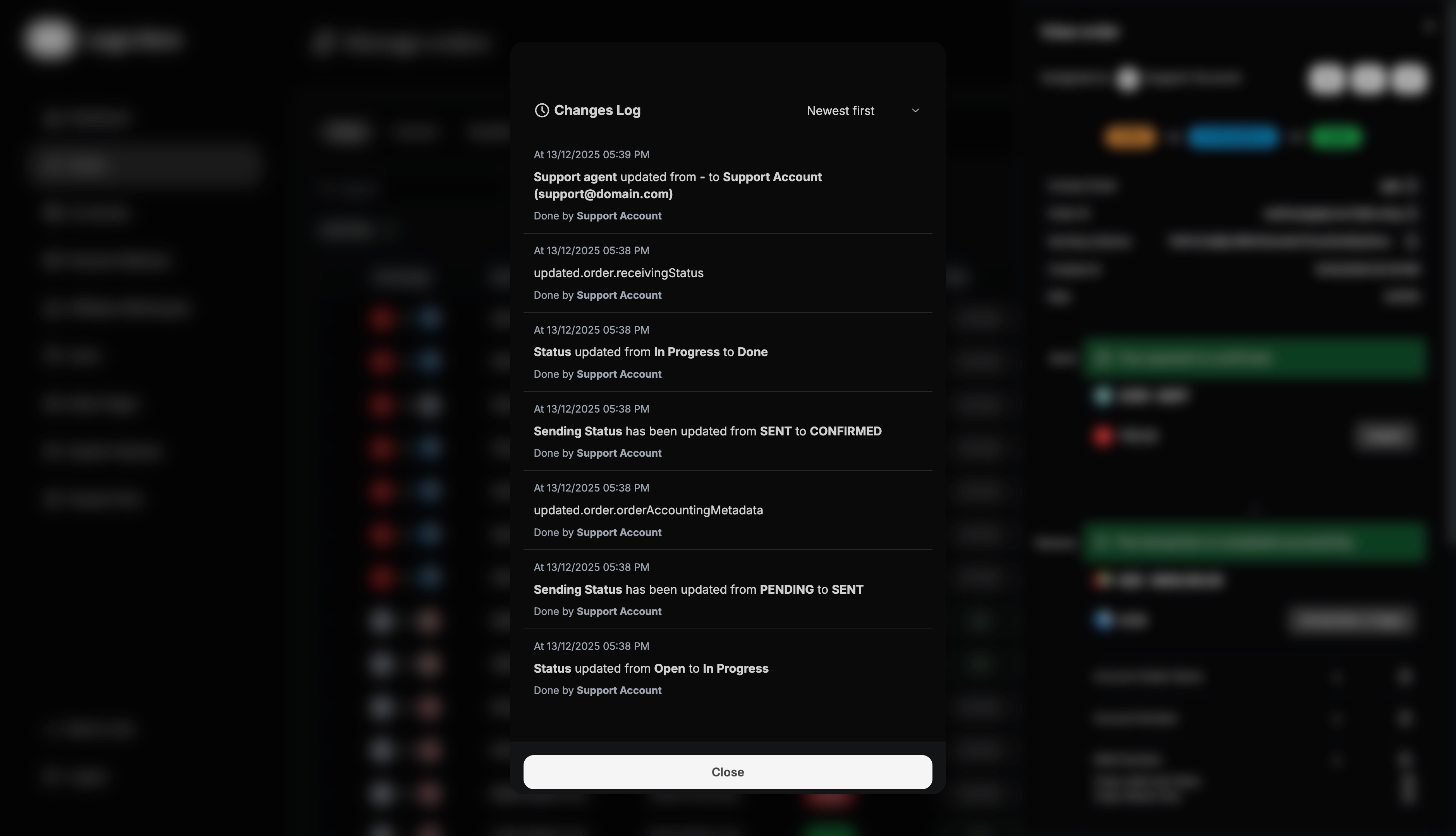
The changes log provides comprehensive order history:
Tracked Information
- User Actions - All customer interactions with the order
- Admin Actions - Every administrative change or update
- Status Changes - Complete status transition history
- Amount Modifications - Any adjustments to send/receive amounts
- Assignment Changes - Who handled the order at each stage
- Timestamps - Exact time of each action or change
Log Benefits
- Audit Trail - Complete record of order handling
- Dispute Resolution - Evidence for customer service issues
- Performance Tracking - Analyze processing times and efficiency
- Compliance - Meet regulatory record-keeping requirements
- Training Tool - Learn from successful and problematic orders
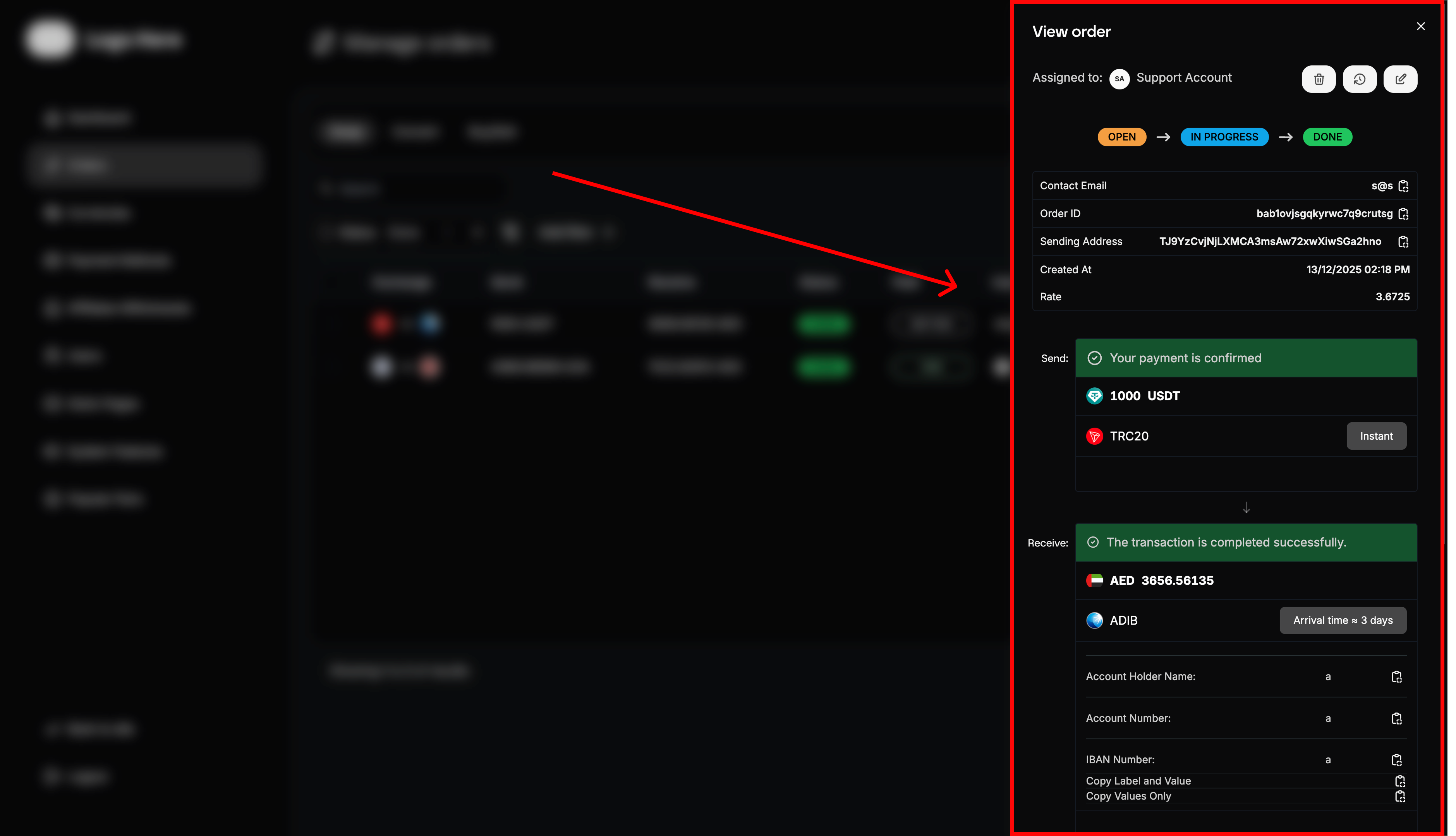
Order Details View
Complete order information includes:
- Order ID - Unique transaction identifier
- User Information - Customer details and contact info
- Exchange Details - Complete transaction specifications
- Payment Instructions - How user should send payment
- Processing Updates - Current status and next steps
- Fee Breakdown - All charges applied to the transaction
Archive Management
Archive Functionality
Archive Orders Command allows:
- Remove orders from main active list
- Maintain clean, organized order displays
- Preserve order data without deletion
- Reduce clutter in daily operations
- Focus on current active orders
Archive Benefits
- Improved Performance - Faster loading of active order lists
- Better Organization - Separate completed from active orders
- Focused Workflow - Concentrate on orders requiring attention
- Historical Access - Archived orders remain searchable
- Data Preservation - No loss of historical transaction data
Retrieving Archived Orders
- Filter Options - Use filters to view archived orders
- Search Functionality - Find specific archived transactions
- Date Range Selection - View archives from specific periods
- Restore Capability - Move archived orders back to main list if needed
Advanced Filtering System
Filter Categories
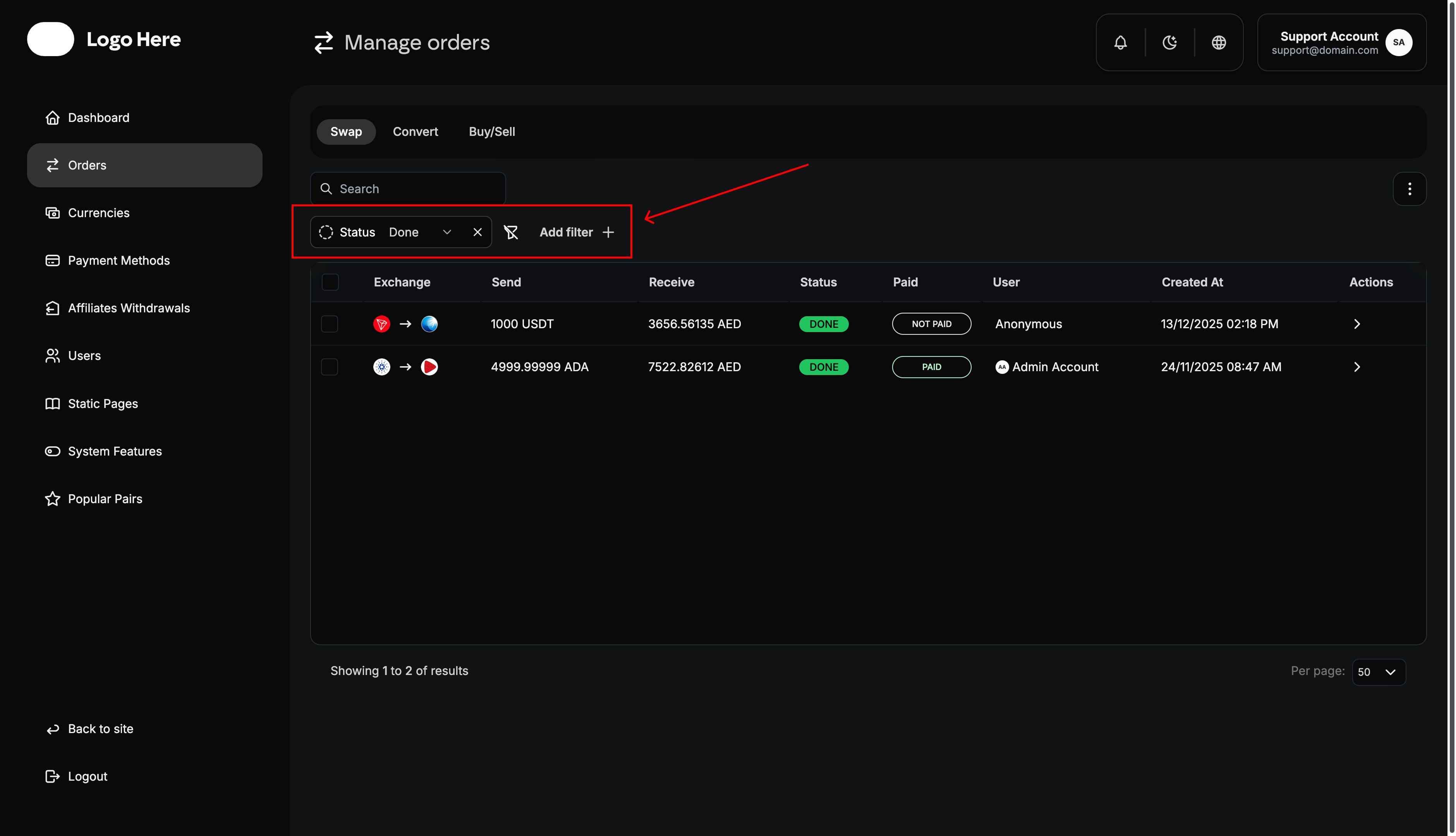
Status Filters
- Open Orders - Show only orders awaiting payment
- In Progress Orders - Display actively processing orders
- Done Orders - Completed successful transactions
- Cancelled Orders - Failed or cancelled transactions
Method Filters
- Send Method - Filter by user’s chosen sending method
- Receive Method - Filter by user’s chosen receiving method
- Payment Combinations - Specific send/receive method pairs
User-Based Filters
- Individual Users - Show all orders from specific customers
- User Types - Filter by user roles or verification levels
- Geographic Filters - Orders from specific countries or regions
Assignment Filters
- Assigned Agent - Orders handled by specific support agents
- Assigned Admin - Orders managed by particular administrators
- Unassigned Orders - Orders not yet assigned to team members
Payment Status Filters
- Marked Paid - Orders with confirmed payments
- Not Paid - Orders still awaiting payment
- Payment Method - Specific payment methods used
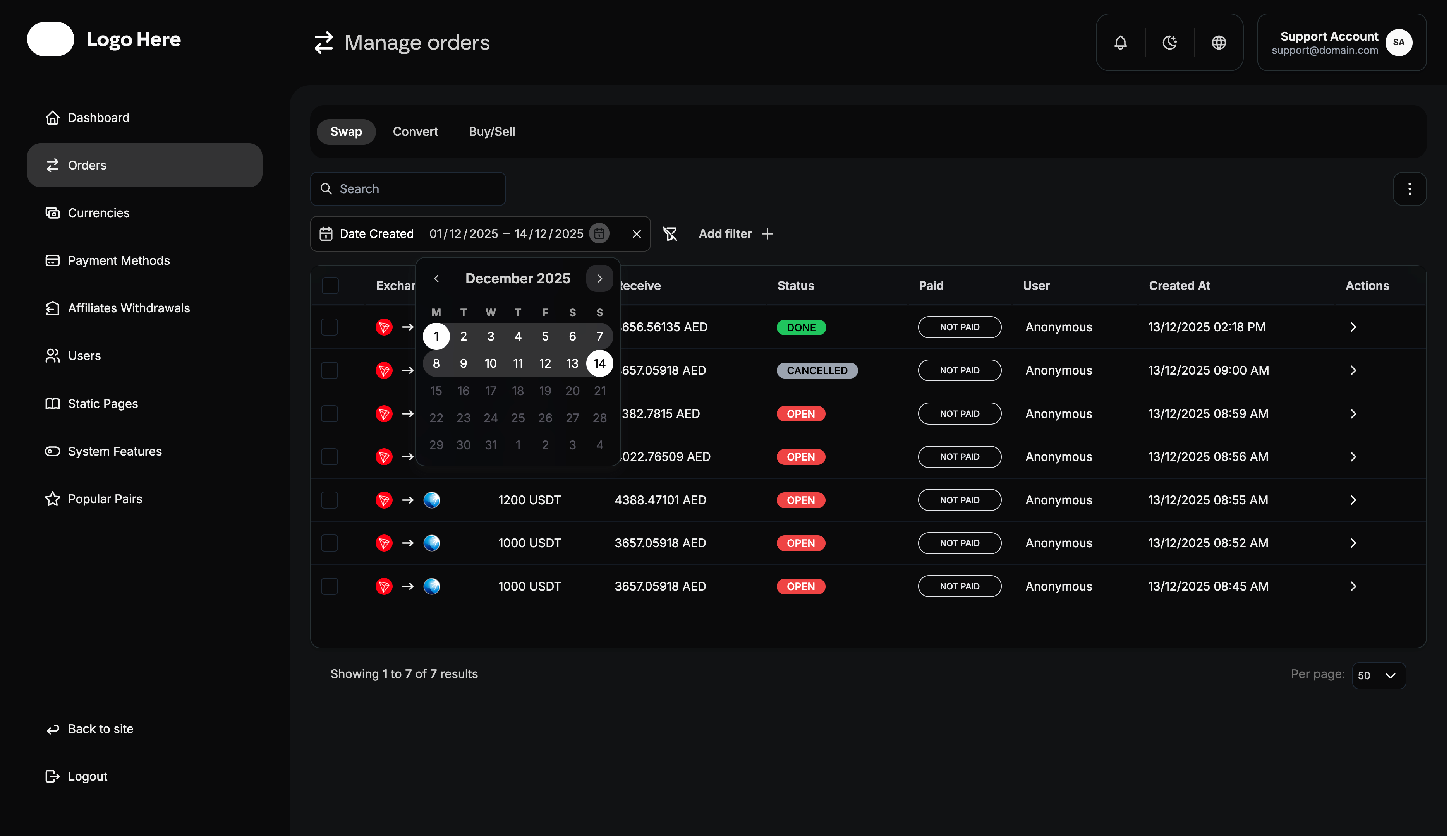
Date and Time Filters
- Date Created - Orders from specific dates or date ranges
Manual Processing Workflows
Standard Processing Steps
- Order Review - Verify all order details and requirements
- Payment Confirmation - Check and confirm user payment
- Exchange Execution - Perform the currency conversion
- Transfer Initiation - Send funds to user’s receiving method
- Confirmation - Verify successful delivery to user
- Status Update - Mark order as completed
- User Notification - Inform customer of successful completion
Document your average processing time per payment method. This helps set accurate expectations for users and identify bottlenecks.
Special Handling Procedures
High-Value Orders
- Additional Verification - Enhanced identity checks
- Management Approval - Senior staff approval required
- Extended Processing - More thorough verification procedures
- Special Documentation - Additional record keeping
Problem Orders
- Investigation Process - Detailed review of issues
- Escalation Procedures - When to involve senior staff
- Resolution Documentation - Record problem and solution
For orders above your platform’s high-value threshold, always get a second verification from another team member before processing.
Automated Processing Integration
Automation Capabilities
Supported Automation
- Payment Detection - Automatic payment confirmation
- Exchange Execution - Automated currency conversion
- Transfer Processing - Automatic fund transfers
- Status Updates - Automated status change notifications
- User Communications - Automatic progress notifications
Manual Override Options
- Manual Review Triggers - When to switch to manual processing
- Admin Intervention - Override automated decisions
- Quality Control - Manual verification of automated processes
- Exception Handling - Manage automation failures
Hybrid Processing Models
Semi-Automated Workflow
- Automated Payment Detection - System confirms payments
- Manual Review - Admin verifies transaction details
- Automated Exchange - System performs conversion
- Manual Transfer - Admin initiates final transfer
- Automated Completion - System updates status and notifies user
Hybrid processing combines the efficiency of automation with the security of manual oversight. It’s ideal for platforms processing 100-1000 orders daily.
This comprehensive order management guide provides the framework for efficiently processing transactions while maintaining high security and customer service standards.