

Currency Management
Currency management is fundamental to your swapping platform’s functionality. This guide covers everything you need to know about adding, configuring, and managing both fiat currencies and cryptocurrencies effectively.
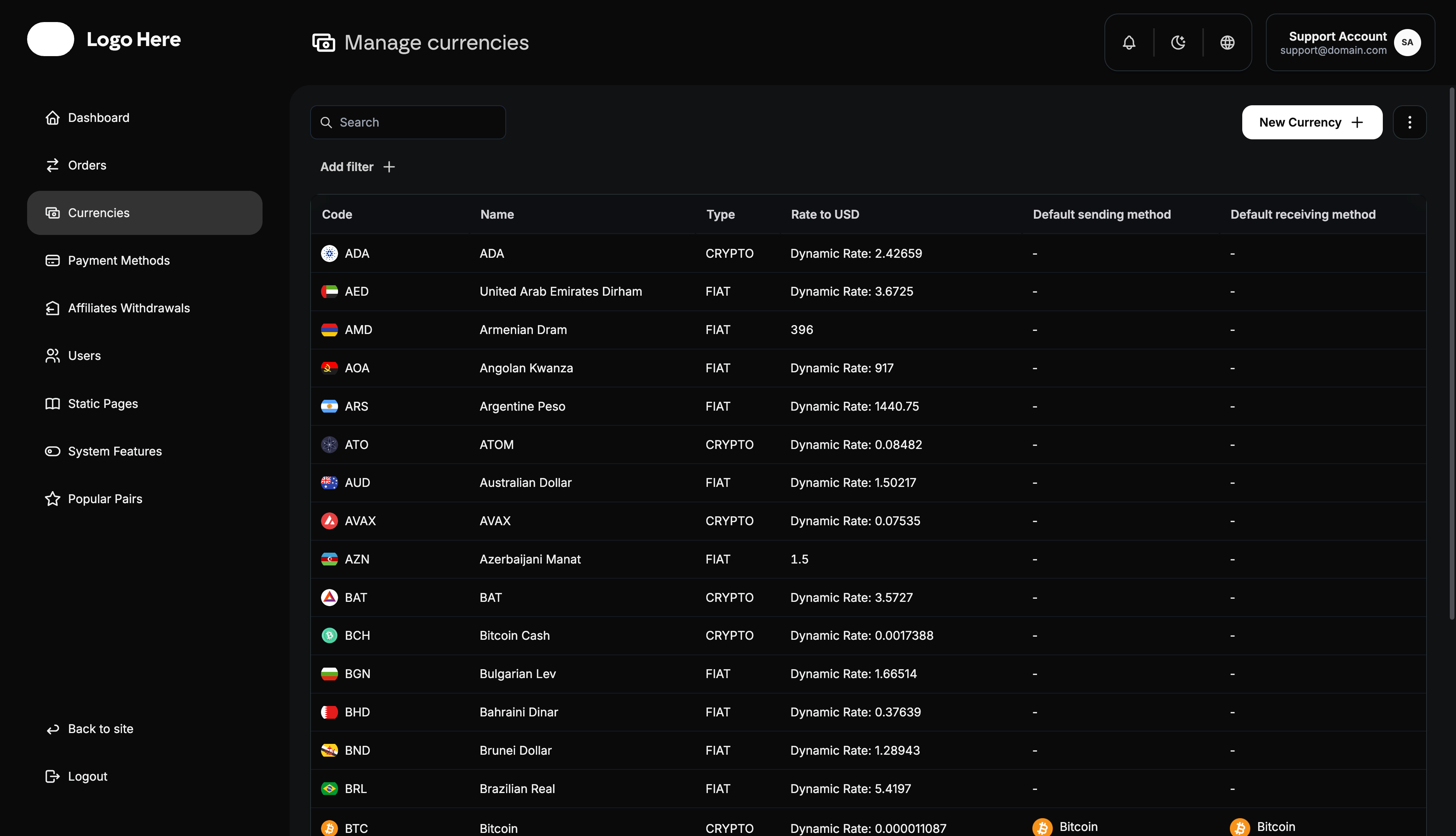
Currency System Overview
Your platform supports two main currency types:
- Fiat Currencies - Traditional government-issued currencies (USD, EUR, GBP, etc.)
- Cryptocurrencies - Digital currencies and tokens (BTC, ETH, USDT, etc.)
Each currency requires proper configuration to ensure seamless integration with payment methods and accurate exchange calculations.
Currency Display Structure
All currencies are organized with the following information:
- Code - Standard currency abbreviation (USD, BTC, EUR)
- Name - Full currency name and country/blockchain
- Type - Classification (Fiat or Cryptocurrency)
- Rate to USD - Exchange rate management method
- Default Sending Method - Primary payment method for sending
- Default Receiving Method - Primary payment method for receiving
Adding Fiat Currencies
Required Information
When adding a fiat currency, provide:
Basic Details
- Currency Code - Standard 3-letter ISO code (USD, EUR, GBP, etc.)
Visual Elements
- Flag Icon - Country flag
Exchange Rate Configuration
- Rate Source - Manual entry or dynamic API feed
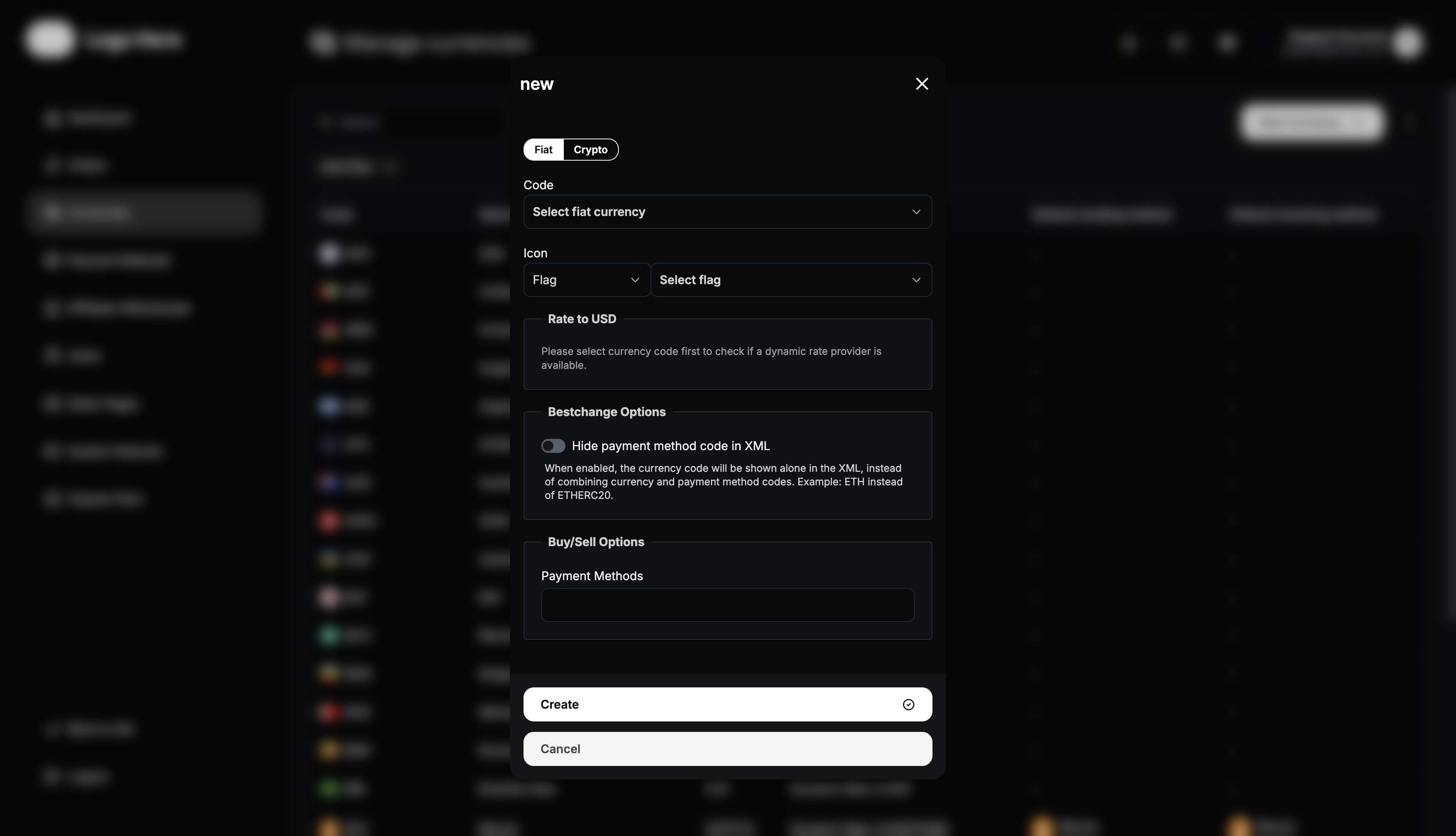
Fiat Currency Setup Process
- Select Currency Code - Choose from standard international currency codes
- Upload Flag Icon - Add country flag or currency symbol image
- Set Exchange Rate - Configure rate to USD (manual or dynamic)
- Configure Availability - Set geographic and user restrictions
- Test Integration - Verify currency works with payment methods
- Activate Currency - Make available to users
Always verify exchange rates before activating a currency. Incorrect rates can lead to significant financial losses for your platform or users.
Adding Cryptocurrencies
Required Information
When adding a cryptocurrency, provide:
Basic Details
- Cryptocurrency Name - Full name (Bitcoin, Ethereum, Tether)
- Currency Code - Standard abbreviation (BTC, ETH, USDT)
Visual Elements
- Logo Image - Official cryptocurrency logo
For multi-chain tokens like USDT, consider creating separate entries for each network (USDT-ERC20, USDT-TRC20, USDT-BEP20) to avoid user confusion.
Cryptocurrency Setup Process
- Enter Crypto Name - Full cryptocurrency name
- Input Currency Code - Standard crypto abbreviation
- Upload Logo - Add official cryptocurrency logo
- Configure Rates - Set up exchange rate management
- Test Transactions - Verify sending/receiving functionality
- Activate Currency - Make available to users
Exchange Rate Management
Rate Management Options
Manual Rate Setting
- Fixed Rates - Set specific exchange rates manually
- Regular Updates - Admin manually updates rates periodically
Dynamic Rate Integration (Add-on)
- API Feeds - Real-time rates from external sources
- Automatic Updates - Rates refresh automatically
- Reduced Maintenance - Less manual intervention required
- Competitive Pricing - Stay current with market rates
If using manual rates, establish a strict update schedule. Outdated rates can result in losses or user complaints about unfair pricing.
Default Payment Methods
Sending Method Configuration
Purpose of Default Sending Methods
- User Experience - Simplify currency selection process
- Efficiency - Pre-select most appropriate payment methods
- Regional Optimization - Choose methods popular in specific regions
- Processing Efficiency - Direct users to preferred processing methods
Setting Default Sending Methods
- Analyze User Behavior - Review most popular method combinations
- Consider Processing Costs - Factor in operational expenses
- Evaluate Success Rates - Choose reliable methods
- Regional Preferences - Match local user preferences
- Update Regularly - Adjust based on performance data
Receiving Method Configuration
Benefits of Default Receiving Methods
- Streamlined Process - Faster order creation for users
- Reduced Errors - Fewer incompatible method selections
- Better Conversion Rates - Optimize for successful completions
- Operational Efficiency - Focus processing on preferred methods
Best Practices
- Match Currency Types - Align fiat currencies with local payment methods
- Evaluate Speed - Select methods with appropriate processing times
- Monitor Performance - Track success rates and adjust accordingly
Currency Integration with Payment Methods
Connecting Currencies to Payment Methods
Integration Benefits
- Relevant Options - Show only compatible payment methods
- Reduced Confusion - Eliminate incompatible combinations
- Better Performance - Faster loading with filtered options
- Improved Success - Higher completion rates
Connection Strategies
- Geographic Matching - Connect local currencies to local payment methods
- Type Alignment - Match cryptocurrency with crypto payment methods
- Popular Combinations - Prioritize commonly used pairs
- Cost Optimization - Connect based on processing costs
Currency-Method Compatibility
Fiat Currency Connections
- USD → PayPal, Bank Transfer, Credit Cards
- EUR → SEPA, Bank Transfer, E-wallets
- GBP → Faster Payments, Bank Transfer
- AED → Local banks, Mobile payments
Cryptocurrency Connections
- BTC → Bitcoin wallets
- ETH → Ethereum wallets
- USDT → Multi-network wallets (ERC-20, TRC-20, BEP-20)
- BNB → Binance ecosystem, BSC wallets
Currency Performance Monitoring
Key Metrics to Track
Usage Statistics
- Transaction Count - Number of orders per currency
- User Preferences - Most popular currency pairs
- Geographic Distribution - Currency usage by region
Technical Performance
- Processing Times - Transaction speed by currency
- System Load - Resource usage by currency type
Performance Optimization
Revenue Optimization
- Margin Adjustment - Optimize profit margins based on competition
- Popular Pairs - Promote high-volume, profitable combinations
- Fee Structure - Balance competitiveness with profitability
- Market Timing - Adjust rates based on market volatility
User Experience Enhancement
- Rate Display - Clear, attractive rate presentation
Advanced Currency Features
Multi-Network Support
Cryptocurrency Networks
- Bitcoin Network - Original Bitcoin blockchain
- Ethereum Network - ERC-20 tokens
- Binance Smart Chain - BEP-20 tokens
- Polygon Network - MATIC-based tokens
- Tron Network - TRC-20 tokens
Network Selection Benefits
- Lower Fees - Users can choose more economical networks
- Faster Transactions - Select networks with quicker confirmations
- User Preference - Match user’s existing wallet networks
- Operational Flexibility - Distribute processing across networks
Security Considerations
Currency Data Protection
- Data Validation - Verify rate data before application
- Backup Systems - Redundant rate data sources
Transaction Security
- Address Validation - Verify cryptocurrency addresses
- Network Verification - Confirm correct blockchain networks
- Amount Limits - Set maximum transaction amounts
- Fraud Detection - Monitor for suspicious currency patterns
Best Practices for Currency Management
Setup and Configuration
- Start with Popular Currencies - Begin with widely-used currencies
- Test Thoroughly - Verify all configurations before activation
- Monitor Performance - Track usage and success rates
- Regular Updates - Keep currency data current and accurate
- User Feedback - Collect and act on user currency preferences
Create a testing checklist for each new currency. Include small test transactions, rate verification, and payment method compatibility checks.
Growth and Expansion
- Market Research - Identify currencies popular in target regions
- Competitive Analysis - Compare currency offerings with competitors
- User Demand - Add currencies based on user requests
- Technical Feasibility - Ensure proper integration capabilities
- Regulatory Compliance - Verify legal requirements for new currencies
This comprehensive currency management guide provides the foundation for building a robust, diverse currency offering that meets user needs while maintaining operational efficiency and profitability.